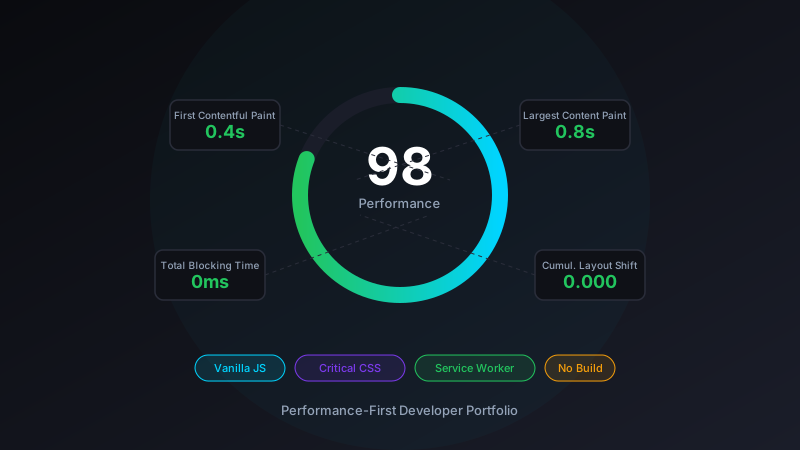
Why No Framework?
Every conversation about building a personal site eventually arrives at the same question: React, Vue, Next.js, Astro, or something else? My answer for this portfolio was none of them — and it was a deliberate decision, not laziness.
A developer portfolio is a mostly-static document. It has a hero section, some project cards, a blog index, and static HTML blog posts. There's a theme toggle, a mobile menu, and a service worker. Nothing in that list requires a component tree, a virtual DOM, hydration, or a 200 KB runtime bundle landing in the user's browser before they see my name.
The calculus changes when a site has real interactivity: forms with complex state, real-time data, client-side routing with shared layout state. But for a portfolio, the framework overhead is pure cost with no offsetting benefit. The first visitor who opens josefresco.com on a slow mobile connection will get the page faster without React than with it.
That said, "no framework" is not the same as "no discipline." The patterns that make framework-based sites maintainable — separation of concerns, reusable components, consistent naming — still matter. They're just expressed differently in vanilla HTML and CSS.
Critical CSS: The First Paint Problem
The most impactful performance decision on the home page is inlining critical CSS. Here's the problem it solves:
When a browser receives HTML, it starts parsing and rendering. The moment it encounters a <link rel="stylesheet">, it pauses rendering and fetches the stylesheet — because the CSS could contain rules that affect layout. For a stylesheet hosted on the same server, this adds one full round-trip before anything appears on screen. On a slow connection, that's the difference between "page starts rendering immediately" and "blank white screen for 800ms."
The solution is to inline the CSS that controls above-the-fold rendering directly in a <style> tag in the <head>. The browser gets the HTML with the critical styles already embedded; it can start rendering the hero section immediately, without waiting for the external stylesheet.
<!-- Critical CSS inlined in <head> -->
<style>
  :root {
    --primary-bg: #0a0b0f;
    --neural-primary: #00d4ff;
    --font-family: 'Inter', -apple-system, sans-serif;
  }
  * { margin: 0; padding: 0; box-sizing: border-box }
  body { font-family: var(--font-family); background: var(--primary-bg); }
  .header { position: fixed; top: 0; backdrop-filter: blur(20px); }
  .hero { padding: 140px 0 100px; min-height: 100vh; }
  /* ... rest of above-fold rules ... */
</style>

<!-- Full stylesheet loaded after -->
<link rel="stylesheet" href="style.css?v=1756732569">
The full style.css — 58 KB covering every section of the site — still loads, but it loads after the browser has already rendered the hero section. The user sees content immediately; the rest of the styles arrive while they're reading.
The Version Query String
That ?v=1756732569 on the stylesheet URL is a cache-busting mechanism. Static files served from GitHub Pages are aggressively cached by browsers and CDNs. When I update style.css, I need browsers to fetch the new version rather than serve the cached one.
The version number is a Unix timestamp generated at build time. Any change to style.css gets a new timestamp, which changes the query string, which is treated as a different URL by the cache — guaranteed fresh fetch. The same pattern applies to script.js. It's simpler than content-hash-based naming and works just as well for a site of this scale.
Deferred JavaScript
Every <script> tag on the page uses the defer attribute:
<script src="global-header.js" defer></script>
<script src="script.js?v=1756062132" defer></script>
defer tells the browser two things: download this script in parallel with HTML parsing (don't block), and execute it after the HTML is fully parsed (don't block the DOM). The net result is that JavaScript never delays the initial render. The page appears complete, then the scripts run and add interactivity.
The separation into two files is intentional:
global-header.js— mobile menu toggle and navigation state. Small and focused (3.4 KB). Runs first.script.js— theme toggle, animations, and service worker registration. Larger (14.4 KB). Runs after.
Because both are deferred, their execution order is guaranteed (they run in document order), but neither blocks the initial render. The mobile menu works as soon as JavaScript runs; the rest of the enhancements layer on top.
The Service Worker: Fast Repeat Visits
The first visit to josefresco.com goes through a normal page load — HTML from GitHub Pages, CSS and JS from cache or origin. The second visit is different: the service worker intercepts the request and serves assets from a local cache, making the load nearly instant.
The caching strategy is straightforward:
// sw.js — simplified
const CACHE_NAME = 'josefresco-v1';
const STATIC_ASSETS = [
    '/',
    '/style.css',
    '/script.js',
    '/global-header.js',
    '/blog/',
    '/about/',
];

self.addEventListener('install', event => {
    event.waitUntil(
        caches.open(CACHE_NAME).then(cache => cache.addAll(STATIC_ASSETS))
    );
});

self.addEventListener('fetch', event => {
    event.respondWith(
        caches.match(event.request).then(cached => {
            return cached || fetch(event.request);
        })
    );
});
Cache-first for static assets means every page navigation after the first one pulls HTML, CSS, and JS from disk rather than the network. For a developer reading through blog posts, this makes the site feel local — instant page loads, no visible network latency.
The trade-off is cache invalidation. When I update the site, I bump the CACHE_NAME version. Old service workers are replaced on the next visit, and the new cache is populated with fresh assets. Not elegant, but reliable.
Resource Hints: Telling the Browser What's Coming
The <head> contains a set of resource hint tags that instruct the browser to start work before it actually needs the resources:
<!-- Start TLS handshakes early -->
<link rel="preconnect" href="https://fonts.googleapis.com" crossorigin>
<link rel="preconnect" href="https://fonts.gstatic.com" crossorigin>

<!-- Resolve DNS early (cheaper than preconnect) -->
<link rel="dns-prefetch" href="//github.com">
<link rel="dns-prefetch" href="//linkedin.com">

<!-- Fetch script early, highest priority -->
<link rel="preload" href="/script.js" as="script">
preconnect for Google Fonts establishes the TCP connection and TLS handshake before the browser has parsed the font reference in the stylesheet. By the time the browser asks for the font, the connection is already open — the font data starts flowing immediately.
dns-prefetch for GitHub and LinkedIn resolves their DNS names early. These aren't resources the page downloads; they're links the user might click. Resolving the DNS ahead of time means the navigation after clicking a link starts with the DNS already resolved.
preload for script.js fetches the script at the highest priority, even though it's deferred (it won't execute until parsing is complete). This ensures the script is ready and waiting when the browser gets to it, rather than being fetched at lower priority and potentially arriving late.
CSS Architecture: Custom Properties and No Pre-processor
The site uses native CSS custom properties (variables) throughout — no Sass, no PostCSS, no CSS-in-JS. Here's the root variable set that everything inherits from:
:root {
    --primary-bg: #0a0b0f;
    --secondary-bg: #1a1d29;
    --card-bg: rgba(26, 29, 41, 0.8);
    --neural-primary: #00d4ff;
    --neural-secondary: #7c3aed;
    --neural-accent: #f59e0b;
    --text-primary: #ffffff;
    --text-secondary: #94a3b8;
    --transition-fast: 0.2s ease;
    --transition-smooth: 0.4s cubic-bezier(0.4, 0, 0.2, 1);
    --container-max: 1200px;
}
The "neural" naming comes from the dark tech aesthetic — cyan primary, purple secondary, amber accent — which maps directly to the neural network background animation. Every color in the design derives from one of these three root hues, keeping the palette coherent without manual coordination.
The theme toggle (dark/light mode) works by overriding these custom properties on the :root element when the light theme class is applied. Because every component uses the variables, a single override propagates everywhere instantly — no JavaScript loops through elements, no inline styles, just a class toggle and CSS cascade.
Fluid Typography with clamp()
Headings scale fluidly between viewport sizes using CSS clamp():
.hero-title {
    font-size: clamp(2.5rem, 5vw, 4rem);
}
clamp(min, preferred, max) means: never smaller than 2.5rem, never larger than 4rem, and scale with the viewport between those bounds. This replaces multiple breakpoint rules with a single declaration, and the scaling is continuous rather than jumping at fixed breakpoints. The result is typography that looks right on everything from a 320px phone to a 4K monitor without a single media query for font size.
Schema.org Structured Data Strategy
Every page on the site includes Schema.org JSON-LD structured data. The home page has two schemas: a WebSite schema with a Person entity, and nothing else — no BlogPosting on the home page because it's not a blog post.
Blog posts have two schemas: a BlogPosting with full metadata (headline, description, image, published date, modified date, keywords, author) and a BreadcrumbList that traces the navigation path back to the home page. Google uses both to generate rich results in search — the BlogPosting enables article-style search cards; the BreadcrumbList shows the site hierarchy in search result URLs.
<script type="application/ld+json">
{
  "@context": "https://schema.org",
  "@type": "BlogPosting",
  "headline": "Post title here",
  "datePublished": "2026-04-09T00:00:00+00:00",
  "dateModified": "2026-04-09T00:00:00+00:00",
  "author": {
    "@type": "Person",
    "name": "Jose Fresco",
    "url": "https://josefresco.com/"
  },
  "publisher": {
    "@type": "Person",
    "name": "Jose Fresco",
    "url": "https://josefresco.com/",
    "logo": {
      "@type": "ImageObject",
      "url": "https://josefresco.com/favicon.ico"
    }
  }
}
</script>

<script type="application/ld+json">
{
  "@context": "https://schema.org",
  "@type": "BreadcrumbList",
  "itemListElement": [
    {"@type": "ListItem", "position": 1, "name": "Home", "item": "https://josefresco.com/"},
    {"@type": "ListItem", "position": 2, "name": "Blog", "item": "https://josefresco.com/blog/"},
    {"@type": "ListItem", "position": 3, "name": "Post title", "item": "https://josefresco.com/blog/post-slug.html"}
  ]
}
</script>
The publisher field uses @type: Person rather than Organization because this is a personal site, not a brand. Google accepts both; the key is that publisher.logo must point to a real image URL — the favicon works for a personal blog.
GitHub Pages as a Hosting Decision
The repo deploys directly to GitHub Pages via the main branch. There's no CI/CD pipeline, no build step, no deployment script. Push to main, GitHub deploys it. Done.
This works because the site is genuinely static: HTML files, a CSS file, a JS file, and images. There's nothing to compile, bundle, or transform. GitHub Pages serves the files exactly as they sit in the repository.
The CNAME file in the root points the GitHub Pages domain to the custom domain josefresco.com. GitHub handles the SSL certificate automatically via Let's Encrypt. Zero infrastructure to manage — which means zero infrastructure to break at 2am.
What I'd Do Differently
A few decisions I'd revisit if starting fresh:
- Automate critical CSS extraction — The critical CSS is currently maintained manually. When I add new above-fold components, I have to remember to add the relevant rules to the inlined block. A build step using a tool like Critters would extract and inline critical CSS automatically. The site's simplicity makes manual management feasible today; it won't scale forever.
- Image optimization pipeline — The
optimize-images.shscript in the repo handles image compression, but it's a manual step. An automated pipeline that generates WebP variants and responsive sizes on commit would improve image performance without depending on remembering to run the script. - Smarter service worker caching — The current implementation is a simple cache-first strategy. A more sophisticated approach would use stale-while-revalidate for pages and network-first for API calls, matching the caching strategy to the volatility of each resource type.
- A proper sitemap generator — The
sitemap.xmlis currently updated manually when blog posts are added. A script that generates the sitemap from the file system would eliminate the risk of missing a post.
The Repo
The full source is at github.com/josefresco/josefresco.github.io. It's a useful reference if you're building a similar static portfolio — the critical CSS pattern, service worker, and Schema.org implementations are all there in plain HTML and vanilla JS, with no toolchain required to read and understand what's happening.
If you're building a developer portfolio and finding yourself evaluating frameworks primarily out of habit, consider whether the site you're describing actually needs one. For a static document with a theme toggle and a mobile menu, vanilla HTML is not a compromise — it's the right tool.