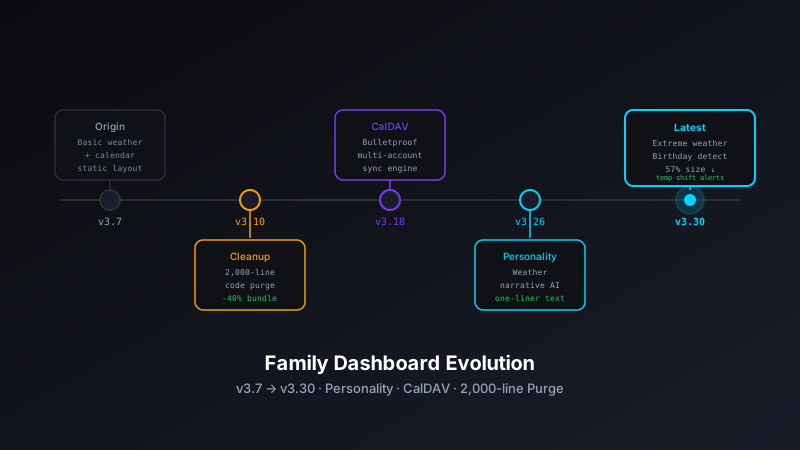
The Family Dashboard has evolved significantly from version 3.7 to 3.26, transforming from a functional weather and calendar display into a personality-driven application with bulletproof reliability. Here's the story of how iterative improvements led to a better product.
The Journey from Functional to Delightful
Version 3.7 already had the core features: multi-calendar integration, weather forecasts, tide data, and sunrise/sunset information. It worked well. But "works well" isn't the same as "delightful to use."
"Software that displays information accurately is good. Software that makes you smile while displaying information accurately is better."
Major Improvements
1. Humorous Weather Narratives
The most visible change: weather forecasts now come with personality. Instead of dry, technical descriptions, the dashboard randomly selects from 36 humorous closing messages that adapt to weather conditions.
Good weather messages:
- "Weather: 10/10, would recommend! 👌"
- "Perfect excuse to touch grass! 🌱"
- "Weather app says you're legally required to go outside! 📱"
- "Even your houseplants are jealous! 🪴"
- "Mother Nature is showing off today! 💅"
Poor weather messages:
- "Perfect day to practice your couch potato skills! 🛋️"
- "Weather report: Netflix stock is up! 📈"
- "Mother Nature called in sick today! 🤒"
- "Weather report: pajamas are business casual today! 👔➡️👕"
- "Perfect conditions for advanced sofa surfing! 🏄♀️"
The system intelligently selects messages based on temperature, precipitation, and conditions. If it's above 60°F with no rain expected, you get encouraging outdoor messages. Otherwise, you get cheeky indoor-friendly quips.
const goodWeatherClosings = [/* 20 messages */];
const poorWeatherClosings = [/* 16 messages */];

if (temp >= 60 && !precipitation?.expected) {
    encouragement = goodWeatherClosings[Math.floor(Math.random() * goodWeatherClosings.length)];
} else {
    encouragement = poorWeatherClosings[Math.floor(Math.random() * poorWeatherClosings.length)];
}
2. Major Architecture Cleanup
Between v3.7 and v3.26, the codebase underwent major surgery. The cleanup removed over 2,000 lines of deprecated code and eliminated entire subsystems that were no longer needed.
What Was Removed:
- OAuth authentication system - Replaced with simpler CalDAV App Password approach
- Vercel deployment infrastructure - Migrated to Netlify Functions
- Debug test files - test-caldav.html, test-events.html removed from production
- Token storage system - No longer needed with CalDAV authentication
- Outdated documentation - VERCEL_DEPLOYMENT.md, README_API_SETUP.md removed
Why This Matters:
Every line of code is a liability. It needs to be maintained, tested, and understood. Removing 2,000+ lines means:
- Faster page loads (smaller JavaScript bundles)
- Fewer potential bugs
- Easier onboarding for contributors
- Lower cognitive overhead when making changes
3. CalDAV Integration Mastery
Calendar integration is the heart of the dashboard, and getting it right took multiple iterations. The evolution from OAuth to CalDAV represents a shift toward simplicity and reliability.
The OAuth Problem
The original implementation used Google OAuth with full API access. This required:
- Complex token refresh logic
- Server-side token storage
- Google Cloud Console project setup
- OAuth consent screens and verification
- Handling token expiration edge cases
The CalDAV Solution
CalDAV is a standard protocol for accessing calendar data. Google Calendar supports it through App Passwords. The new approach is dramatically simpler:
- User generates an App Password from Google settings
- Dashboard stores credentials in LocalStorage
- Netlify Function proxies CalDAV requests to avoid CORS issues
- No token refresh needed - App Passwords don't expire
Google Workspace Support
Version 3.24+ added support for Google Workspace accounts, which use different CalDAV endpoint patterns. The implementation now handles both Gmail and Workspace accounts seamlessly with automatic endpoint detection and fallback.
4. Timezone Bug Fixes
One of the most frustrating bugs in any calendar application: events appearing on the wrong day or at the wrong time. The dashboard went through multiple iterations to get timezone handling correct.
The Problem:
Calendar events are stored in UTC but need to be displayed in Eastern Time. The dashboard needs to:
- Request events for "today" in Eastern Time
- Convert that to a UTC date range for the CalDAV query
- Parse returned events and convert back to Eastern Time
- Handle the 5 PM cutoff for switching to tomorrow's events
The Fix:
Multiple commits addressed edge cases:
- Timezone-aware date calculations - Properly add 4 hours for EDT to UTC conversion
- Date range precision - Reduced range by 1 hour to avoid next-day event overlap
- CalDAV XML parsing - Handle different date formats from Gmail vs Workspace
- Debug logging - Comprehensive time conversion tracking to catch regressions
Migration to Netlify Functions
The shift from Vercel to Netlify was driven by better CalDAV proxy support and simpler deployment configuration.
Why Netlify?
- Simpler function format - Traditional Node.js exports vs Vercel's newer edge runtime
- Better CORS handling - Easier to configure cross-origin headers
- Reliable deployments - More predictable build and deploy process
- Built-in form handling - Useful for future contact form integration
The Netlify Function
The CalDAV proxy function handles authentication, XML parsing, and event formatting. It's the backbone of calendar functionality:
exports.handler = async (event) => {
    const { email, password } = JSON.parse(event.body);

    // Construct CalDAV endpoint
    const endpoint = `https://caldav.calendar.google.com/...`;

    // Make CalDAV request with Basic Auth
    const response = await fetch(endpoint, {
        headers: {
            'Authorization': `Basic ${btoa(email + ':' + password)}`
        }
    });

    // Parse XML response
    const events = parseCalDAVResponse(await response.text());

    return {
        statusCode: 200,
        body: JSON.stringify({ events })
    };
};
Technical Lessons Learned
1. Simplicity Wins
Replacing OAuth with CalDAV reduced complexity dramatically. The new approach has fewer moving parts, which means fewer failure modes. When debugging calendar issues, there are now three layers to check instead of seven.
2. Personality Matters
The humorous weather messages transform the dashboard from a tool into something people enjoy checking. It's a small change in code (adding random message selection) but a big change in user experience.
3. Timezone Handling is Hard
Getting dates right across timezones requires careful testing. The multiple bug fix commits show that edge cases appear in production that don't show up in development. Comprehensive logging was essential for debugging user-reported issues.
4. Delete Code Aggressively
The 2,000+ line reduction shows the value of pruning dead code. Every deprecated function removed is one less thing to maintain. If you're not using it, delete it. Version control remembers if you need it back.
5. Serverless Functions Enable Client-Side Apps
The CalDAV proxy demonstrates how serverless functions solve CORS issues while keeping the main app client-side. A single 200-line function enables calendar integration without managing a full backend server.
State at v3.26
The dashboard at v3.26 ran as a pure static site on GitHub Pages with a single Netlify Function for CalDAV proxying. The modular refactor extracted five new files — weather-narrative-engine.js, caldav-client.js, api-client.js, date-utils.js, and logger.js — creating clean module boundaries that would make future changes much easier. It featured:
- Personality-driven weather forecasts with 156 randomized messages across four categories
- Reliable CalDAV integration for Gmail and Google Workspace
- Accurate timezone handling for Eastern Time events
- Modular architecture with clearly separated concerns
- PWA capabilities for mobile installation
- Room-readable UI optimized for 1024x768 displays
What Came Next: v3.30
The modular architecture from v3.26 paid its first dividend in v3.30. The entire 156-entry commentary set — comedian-style quips that had accumulated without much curation — was replaced with 56 clean, original one-liners. Because weather-narrative-engine.js owned the commentary data with a narrow interface, the change required editing exactly one file. The rest of the dashboard was untouched.
v3.30.2 also tightened the emoji usage, adjusted the extreme weather thresholds, and simplified the narrative selection logic. The full story is in the v3.30 post.
The Philosophy of Iterative Improvement
The evolution from v3.7 to v3.26 wasn't planned as a major rewrite. Each improvement addressed a specific pain point:
- Weather felt dry → Add personality
- OAuth was complex → Switch to CalDAV
- Codebase was bloated → Delete unused code
- Timezones were buggy → Add comprehensive debugging and fixes
- Vercel was problematic → Migrate to Netlify
This incremental approach means the dashboard never broke for extended periods. Each change was isolated, tested, and deployed independently. The sum of small improvements resulted in a transformed application.
Conclusion
The Family Dashboard demonstrates that great software emerges from continuous refinement. Version 3.26 is better than 3.7 not because of a grand redesign, but because of dozens of focused improvements over time.
The addition of humorous weather messages shows that technical excellence and delightful user experience aren't mutually exclusive. The CalDAV migration proves that simpler solutions often work better. And the timezone fixes remind us that getting the basics right requires persistent attention to detail.
Building software is an iterative process. Ship, observe, improve, repeat.