The Problem
We've all been there: you find a great Reddit post and want to share it with a friend or family member. But when they click the link, they're hit with:
- Login walls — "Sign in to continue"
- App install prompts — "Open in the Reddit app"
- Ads and promoted content — Cluttering the reading experience
- Endless scrolling — Recommended posts, trending content, noise everywhere
For a simple act of sharing, the experience is frustrating — especially for less tech-savvy users who just want to read what you sent them.
Enter SafeShare
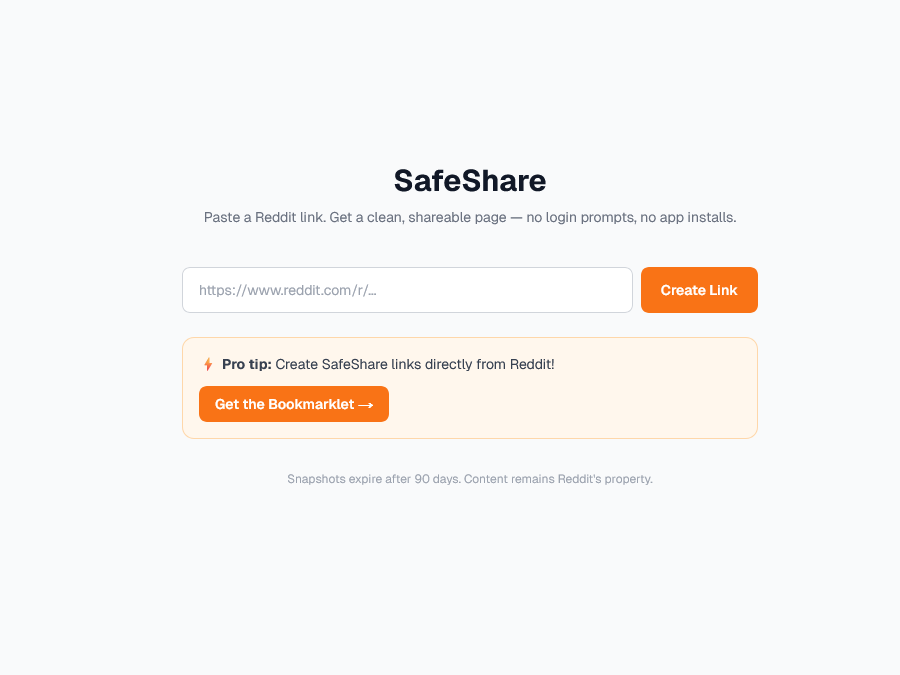
SafeShare is my solution to this problem. It's a clean reader view for Reddit posts that strips away everything except what matters: the post content and top comments.
Here's how it works:
- Paste a Reddit URL into SafeShare
- Get a clean, shareable link
- Anyone who visits sees the post content and comments — nothing else
Snapshots are stored for 90 days, giving you plenty of time to share before they expire.
Supported Content
SafeShare handles all the common Reddit post types:
- Text posts — Full self-post content with formatting
- Image posts — Single images and galleries
- Videos — Reddit-hosted videos (note: no audio due to Reddit's streaming format)
- External links — Link posts with preview images
The Bookmarklet Feature
The real magic happens with the bookmarklet. Instead of copying a Reddit URL, pasting it into SafeShare, and then sharing the generated link — you can do it all in one click.
How to use the bookmarklet:
- Drag the "SafeShare" button to your browser's bookmarks bar
- Navigate to any Reddit post
- Click the bookmarklet
- Your clean SafeShare link is automatically copied to clipboard
- Paste and share!
The bookmarklet fetches the post data directly from Reddit's API (client-side to avoid CORS issues), sends it to the SafeShare backend, and returns a shareable link — all in under a second.
Tech Stack
SafeShare is built with modern, serverless technologies:
- Next.js 16 — App Router, React Server Components, optimized performance
- Vercel — Hosting, edge functions, and automatic deployments
- Vercel Redis — Fast, ephemeral storage for post snapshots (90-day TTL)
- Tailwind CSS — Clean, responsive UI
- TypeScript — Type-safe development
Architecture Notes
One interesting challenge: Reddit's API blocks server-side requests from datacenter IPs (like Vercel's). To work around this, SafeShare fetches Reddit data directly in the browser, then stores it server-side. This means:
- No Reddit API credentials are required
- No server-side rate limiting issues
- The backend only stores data — it never talks to Reddit
This architecture keeps the project simple and free to host, while still providing a reliable sharing experience.
Local Development
Want to run SafeShare locally? Here's how:
# Clone the repository
git clone https://github.com/josefresco/safe-share.git
cd safe-share

# Install dependencies
npm install

# Pull environment variables from Vercel
vercel env pull .env.local

# Start dev server
npm run dev
Open http://localhost:3000 and you're ready to go.
Environment Variables
SafeShare requires just one environment variable:
| Variable | Description |
|---|---|
| REDIS_URL | Vercel Redis connection URL |
Deployment
SafeShare is connected to GitHub — any push to master triggers an automatic Vercel deployment. This means:
- Zero-config deployments
- Preview URLs for every branch
- Automatic SSL certificates
- Global edge caching
How the App Router Structures the Application
SafeShare is built on Next.js 16 with the App Router — not the older Pages Router. This shapes how routes, data fetching, and server/client components are organized.
The core route structure:
app/
├── layout.tsx          # Root layout (shared head, fonts)
├── page.tsx            # Landing page — paste URL or use bookmarklet
├── [id]/
│   └── page.tsx        # Snapshot viewer — renders a stored post
└── api/
    ├── store/
    │   └── route.ts    # POST endpoint — receives snapshot from bookmarklet
    └── snapshot/
        └── [id]/
            └── route.ts  # GET endpoint — retrieves snapshot for viewer
The landing page (app/page.tsx) is a Client Component — it needs the URL input field and form submission logic to run in the browser. The snapshot viewer (app/[id]/page.tsx) is a Server Component — it fetches the snapshot from Redis at request time and renders the post HTML server-side, so the reader sees fully-rendered content with no client-side hydration required for the post body.
Storing a Snapshot
When the bookmarklet (or the paste form on the landing page) sends a Reddit post to SafeShare, the /api/store route handles it:
// app/api/store/route.ts
import { Redis } from '@upstash/redis';
import { nanoid } from 'nanoid';

const redis = new Redis({ url: process.env.REDIS_URL! });

export async function POST(request: Request) {
  const snapshot = await request.json();

  // Basic validation
  if (!snapshot.title || !snapshot.subreddit) {
    return Response.json({ error: 'Invalid snapshot' }, { status: 400 });
  }

  const id = nanoid(10);
  const ttl = 60 * 60 * 24 * 90; // 90 days in seconds

  await redis.set(`post:${id}`, JSON.stringify(snapshot), { ex: ttl });

  return Response.json({ id, url: `https://safe-share.vercel.app/${id}` });
}
nanoid generates a short, URL-safe ID. The snapshot is stored in Redis with a 90-day TTL — after that, the key expires automatically and the shareable link returns a 404. No cleanup job needed.
Rendering a Snapshot
The viewer route fetches from Redis on the server and renders synchronously:
// app/[id]/page.tsx
import { Redis } from '@upstash/redis';
import { notFound } from 'next/navigation';

const redis = new Redis({ url: process.env.REDIS_URL! });

export default async function SnapshotPage({ params }: { params: { id: string } }) {
  const raw = await redis.get(`post:${params.id}`);

  if (!raw) notFound();

  const post = typeof raw === 'string' ? JSON.parse(raw) : raw;

  return (
    <article>
      <h1>{post.title}</h1>
      <p>r/{post.subreddit} · {post.score} points</p>
      <div dangerouslySetInnerHTML={{ __html: post.bodyHtml }} />
      {/* Top comments rendered here */}
    </article>
  );
}
Because this is a Server Component, the Redis fetch happens at request time without any client-side JavaScript. The rendered HTML reaches the browser ready to display. For a read-only view of a stored post, that's exactly the right trade-off — fast first paint, no loading spinner, no layout shift.
What's Next
SafeShare is already useful in its current form, but there are plenty of ideas for future improvements:
- Custom themes — Dark mode (already there!), light mode, or fun color schemes
- Comment depth options — Choose how many levels of nested comments to display
- Export options — Download posts as PDF or Markdown
- Analytics — Track how many times your shared links are viewed (privacy-respecting, of course)
April 2026 Update
A few improvements landed in April 2026 based on real-world usage and user reports:
- Bookmarklet reliability — The bookmarklet now handles Reddit's occasional API shape changes more gracefully, falling back to the URL-paste flow instead of silently failing.
- Gallery post support — Multi-image gallery posts previously only showed the first image. The snapshot now captures all gallery images and renders them in a scrollable grid in the clean view.
- Snapshot preview — Before the bookmarklet copies the SafeShare link to your clipboard, it briefly shows a toast with the post title so you can confirm you're sharing the right thing.
- Error page improvements — Expired snapshots (past the 90-day TTL) now show a helpful page with the original Reddit URL rather than a generic 404.
The core architecture is unchanged — client-side Reddit fetch, server-side Redis storage, 90-day TTL. These are surface-level improvements that make the existing flow more reliable.
Conclusion
SafeShare solves a real problem I encountered daily: sharing Reddit content without the friction. Whether you're sharing a funny post with family, a technical discussion with colleagues, or news with friends, SafeShare makes it clean and simple.
The one-click bookmarklet is the killer feature — it turns a multi-step process into a single click. Once you start using it, you'll wonder how you ever shared Reddit links any other way.