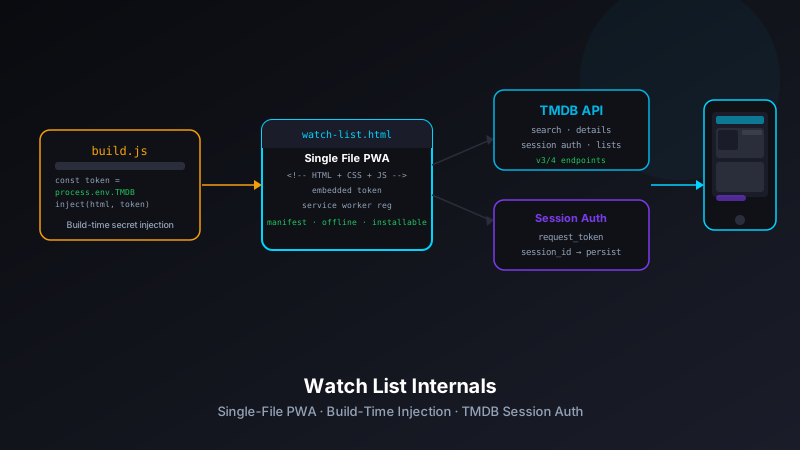
build.js script injects environment variables at deploy time via token substitution. TMDB session authentication syncs the watchlist to a real TMDB account. Streaming providers are filtered by configurable constants (MY_SERVICES, EXCLUDED_PROVIDERS), and an optional PIN gates adult content. This post covers the architecture decisions behind each of those choices.
Why a Single File?
The previous post on Watch List covered why it exists — a private, ad-free alternative to JustWatch. This one covers how it's built. The most unusual decision is that the entire application lives in a single index.html file: HTML structure, CSS, and JavaScript all in one place.
This isn't laziness or a temporary shortcut — it's a deliberate architectural choice that pays off in several ways:
- Zero build complexity — no bundler config, no import graph, no module system to reason about. The file is what the browser gets.
- Instant PWA installation — a single-file app caches perfectly with a service worker. One cache entry covers the entire application shell.
- Deployable anywhere — drop the file on any static host and it runs. No npm install, no build step on the host.
- Easy to audit — every line of the application is in one place. No barrel files, no re-exports, no "it's defined somewhere in node_modules."
The trade-off is obvious: a very large HTML file gets unwieldy. For Watch List, the file stays manageable because the app has a focused scope — search, details, watchlist. No feature creep, no growing surface area. The constraint is self-enforcing.
The File Structure
Despite being a single file, the directory still has meaningful supporting files:
watch-list/
├── index.html          # Complete application — HTML, CSS, JS
├── build.js            # Credential injection script (runs at deploy time)
├── vercel.json         # Vercel configuration
├── favicon.svg         # App icon (vector, scales to any size)
├── apple-touch-icon.png # iOS home screen icon
└── .gitignore          # Excludes .env and build artifacts
The build.js script is the interesting piece. Let's look at how it works.
Build-Time Credential Injection
Watch List needs a TMDB API key, a TMDB session ID (for watchlist sync), and an optional adult content PIN. These are secrets — they can't live in version control, but the app is a static HTML file with no server-side rendering to inject them at request time.
The solution: token substitution at build time. The source index.html contains placeholder tokens:
<!-- Inside index.html (source) -->
<script>
  const TMDB_API_KEY = '%%TMDB_API_KEY%%';
  const TMDB_SESSION_ID = '%%TMDB_SESSION_ID%%';
  const ADULT_PIN = '%%ADULT_PIN%%';
  const MY_SERVICES = ['Netflix', 'Max', 'Disney Plus', 'Hulu'];
  const EXCLUDED_PROVIDERS = ['Peacock Premium Plus'];
</script>
The build.js script reads the HTML, replaces each %%TOKEN%% with the corresponding environment variable, and writes the result to a dist file that Vercel serves:
// build.js
const fs = require('fs');

let html = fs.readFileSync('index.html', 'utf8');

const replacements = {
  '%%TMDB_API_KEY%%': process.env.TMDB_API_KEY || '',
  '%%TMDB_SESSION_ID%%': process.env.TMDB_SESSION_ID || '',
  '%%ADULT_PIN%%': process.env.ADULT_PIN || '',
};

for (const [token, value] of Object.entries(replacements)) {
  html = html.replaceAll(token, value);
}

fs.writeFileSync('dist/index.html', html);
console.log('Build complete — credentials injected.');
Vercel's build step runs node build.js before deployment, pulling values from the project's environment variable configuration. The repo itself never contains the actual keys — only the tokens. A fresh clone of the repo is safe to share publicly.
Why Not a .env File?
A .env file would work for local development, and Watch List uses one for that purpose (gitignored). But for production, the environment variables live in Vercel's project settings — encrypted at rest, injected only at build time, never in the file system of the deployed artifact. Token substitution bridges the gap between "static file" and "has secrets."
TMDB Session Authentication
The watchlist persistence is the most technically interesting piece. The earlier Watch List version stored the watchlist in localStorage — simple, private, but device-local. You couldn't pick up your list on a different device or browser.
The current version uses TMDB's session authentication to sync the watchlist to your TMDB account. TMDB's watchlist API is the same one their official apps use — it's robust, free, and doesn't require building any backend infrastructure.
The session flow works like this:
- Generate a request token via
/authentication/token/new - Redirect the user to TMDB's approval page:
https://www.themoviedb.org/authenticate/{request_token} - After approval, exchange the approved request token for a session ID via
/authentication/session/new - Store the session ID — this is the
TMDB_SESSION_IDenvironment variable injected at build time
With a valid session ID, the app can call /account/{account_id}/watchlist/movies to read the watchlist and /account/{account_id}/watchlist (POST) to add or remove titles. The watchlist lives on TMDB's servers and is visible across every device where you're logged in.
// Adding a movie to the TMDB watchlist
async function addToWatchlist(mediaId, mediaType = 'movie') {
  const accountId = await getAccountId(); // cached after first call

  await fetch(
    `https://api.themoviedb.org/3/account/${accountId}/watchlist`,
    {
      method: 'POST',
      headers: {
        'Content-Type': 'application/json',
        'Authorization': `Bearer ${TMDB_API_KEY}`,
      },
      body: JSON.stringify({
        media_type: mediaType,
        media_id: mediaId,
        watchlist: true,
      }),
    }
  );
}
The session ID is a long-lived token (it doesn't expire unless manually revoked), which makes it suitable for the build-time injection pattern. Generate it once, put it in Vercel's environment variables, and it works until you decide to rotate it.
Streaming Provider Customization
One of the sharpest differences between Watch List and JustWatch is how streaming providers are displayed. JustWatch shows every available service for every region — useful if you want to rent a title, but noisy if you only care about services you subscribe to.
Watch List uses two constants to control what you see:
// Configured in index.html — set these to your actual subscriptions
const MY_SERVICES = ['Netflix', 'Max', 'Disney Plus', 'Hulu'];
const EXCLUDED_PROVIDERS = ['Peacock Premium Plus', 'Paramount Plus Showtime'];
MY_SERVICES is a priority list — providers in this array appear first in the streaming availability section, highlighted as services you have. EXCLUDED_PROVIDERS is a blocklist — providers here are filtered out entirely, regardless of what TMDB returns.
The result: a movie detail page that immediately answers "can I watch this tonight?" without scrolling past a dozen services you don't have. The TMDB watch providers endpoint returns data for dozens of providers per region; the filter cuts it down to what's actually relevant.
function filterProviders(providers) {
  // Remove excluded providers entirely
  const filtered = providers.filter(
    p => !EXCLUDED_PROVIDERS.includes(p.provider_name)
  );

  // Sort: subscribed services first, then alphabetical
  return filtered.sort((a, b) => {
    const aOwned = MY_SERVICES.includes(a.provider_name);
    const bOwned = MY_SERVICES.includes(b.provider_name);
    if (aOwned && !bOwned) return -1;
    if (!aOwned && bOwned) return 1;
    return a.provider_name.localeCompare(b.provider_name);
  });
}
Parental Controls via ADULT_PIN
TMDB's API can return adult content if the account is configured to allow it. Watch List includes an optional PIN gate for this: if ADULT_PIN is set as an environment variable (and injected at build time), adult content results are hidden behind a PIN prompt rather than displayed openly.
This is a household feature — useful if the app is pinned to a shared family device. The PIN doesn't authenticate against any server; it's a client-side check against the injected constant. Anyone with DevTools access can see the PIN in the source. But for a family-oriented access control on a trusted device, it's exactly the right level of security — enough friction to keep it out of casual view, not a security boundary against a determined user.
function checkAdultPin() {
  if (!ADULT_PIN) return true; // No PIN set — adult content allowed

  const entered = prompt('Enter PIN to view adult content:');
  return entered === ADULT_PIN;
}
PWA Installation and the Service Worker
Watch List is installable on iOS, Android, and desktop Chromium browsers. The installation experience uses a Web App Manifest and a service worker that caches the application shell.
The manifest configuration in vercel.json ensures the right headers are served, and the inline manifest in index.html describes the app to the browser:
<!-- Inline manifest reference -->
<link rel="manifest" href="/manifest.json">
<meta name="apple-mobile-web-app-capable" content="yes">
<meta name="apple-mobile-web-app-status-bar-style" content="black-translucent">
<link rel="apple-touch-icon" href="/apple-touch-icon.png">
The service worker strategy is cache-first for the app shell and network-first for TMDB API responses. The app shell (the HTML file itself) loads instantly on repeat visits; search results and movie details always come from the network to ensure freshness. Streaming availability data, which changes infrequently, gets a short cache TTL — typically five minutes.
Because the entire app is one file, cache invalidation is straightforward: bump the service worker cache name when deploying an update. On the next visit, the old cache is replaced and the new single-file app is served.
Vercel Deployment Pipeline
The vercel.json configuration wires the build step into the Vercel deployment:
{
  "buildCommand": "node build.js",
  "outputDirectory": "dist",
  "framework": null
}
framework: null tells Vercel this isn't a Next.js, Vite, or CRA project — it's a plain Node.js script. Vercel runs node build.js, which reads index.html, injects the environment variables, and writes the output to dist/. Vercel serves the dist/ directory as a static site.
The deployment pipeline is triggered by every push to master. Preview deployments are generated for every branch — useful for testing provider filter changes or new UI features without affecting the production app.
What the Single-File Constraint Rules Out
Choosing a single-file architecture means some things are deliberately off the table:
- Code splitting — there's nothing to split. The entire app loads on first visit. For an app this size, that's not a problem; for a large application, it would be.
- TypeScript type-checking — you can write TypeScript in a
<script type="ts">tag with some tooling help, but it's not idiomatic. Watch List is plain JavaScript. - Component isolation — CSS and JavaScript for all features live in the same scope. Naming discipline substitutes for the scoping that frameworks provide.
- Automated testing — testing a browser-rendered single-file app with a test framework requires a headless browser. For a personal project, manual testing is sufficient. For a production app, it wouldn't be.
None of these are dealbreakers for a private personal tool. They would matter for a team project or a public product.
Lessons from the Build
The most transferable insight from Watch List is the build-time credential injection pattern. It solves the "secrets in a static file" problem cleanly for Vercel-hosted projects, and the pattern works for any static site that needs to embed secrets — not just single-file apps. If you're building a static frontend that talks directly to an API and don't want to route everything through a serverless function, token substitution at build time is a straightforward approach worth considering.
The second takeaway is about PWA installation. The gap between "website" and "app" is smaller than most developers assume. A service worker, a manifest, and an apple-touch-icon are enough to make something installable and indistinguishable from a native app on the home screen. For personal tools and internal dashboards, this is often the right deployment target — zero app store friction, zero review process, instant updates.
The repo is at github.com/josefresco/watch-list. The single-file approach, build script, and provider filter are all there to read and adapt.