How It Started
The original Arpy Assist was a Flask web UI sitting in front of the Qwen CLI. You typed a question, it ran qwen in a subprocess, and it showed you the output. That was the whole thing. Useful for reading code explanations on a phone, not useful for actually getting work done.
The first limitation showed up quickly: Qwen would generate a fix for a bug, but applying it still required manually copying the code into a terminal. The web interface had no write access to anything — it was read-only AI, which is about half as useful as it sounds.
The second limitation was model quality. Qwen Coder Plus is good, but Claude Code — running Claude Sonnet or Opus — is in a different tier for multi-step coding tasks. When a task involves reading a file, understanding its context, making a targeted edit, running a test, and committing the result, the quality of the reasoning matters at every step. After running both side by side for a few weeks, the switch was obvious.
The Upgrade: From Chat Interface to Agent Loop
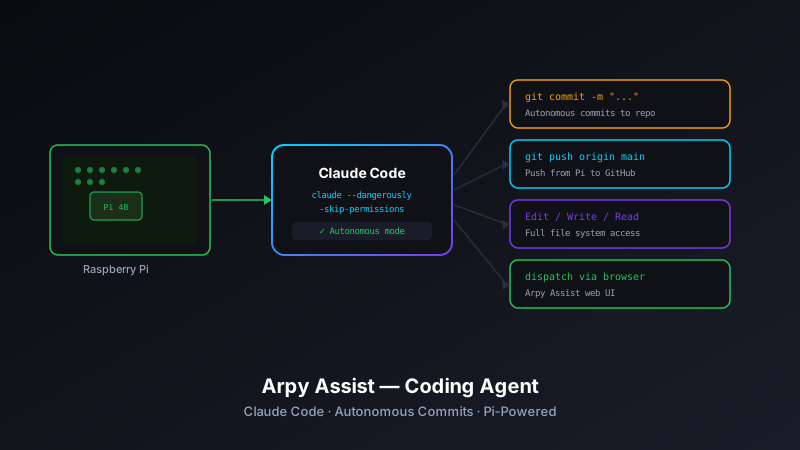
The core architectural change was replacing the subprocess-to-CLI model with an agent loop that can take actions, not just produce text. Here's the difference in practice:
Old flow (Qwen web interface):
- User types: "Add error handling to the backup script"
- Arpy Assist runs
qwen "Add error handling to the backup script" - Qwen outputs: a code block with the suggested changes
- User manually copies the code and applies it
New flow (coding agent):
- User types: "Add error handling to the backup script"
- Arpy Assist invokes Claude Code with the target repo path
- Claude Code reads the backup script, identifies where error handling is needed, writes the changes, and runs a syntax check
- The agent loop confirms success and commits the changes
- User sees: "Done — committed as 'Add error handling to backup.py'"
The difference is that step 4 (applying the change) is no longer the user's job.
The raspberry-pi-agent Layer
Arpy Assist doesn't run shell commands directly. That responsibility belongs to raspberry-pi-agent — the Python command dispatcher that underlies most of the Pi automation stack.
When Arpy Assist needs to clone a repo, check a service, or read a log, it constructs a typed command object and hands it to the agent's execute() method. The agent handles subprocess management, timeout enforcement, error formatting, and output normalization. Arpy Assist gets back a consistent dict and never has to think about subprocess plumbing:
from raspberry_pi_agent import PiAgent, ShellCommand, ServiceCommand

agent = PiAgent()

# Clone a repo into the workspace
result = agent.execute(ShellCommand(
    command=f"git clone git@github.com:josefresco/{repo_name}.git /workspace/{repo_name}",
    timeout=60
))

if result['success']:
    print(f"Cloned to /workspace/{repo_name}")
else:
    print(f"Clone failed: {result['error']}")
This separation keeps Arpy Assist's web layer focused on request routing and response formatting, while the agent layer owns everything that touches the OS.
The Coding Agent Task Runner
The heart of the new Arpy Assist is the task runner — a Python module that orchestrates the full coding workflow for a given request. A task breaks down into four phases:
1. Workspace Setup
If the target repo isn't already on disk, the task runner clones it. If it is, it fetches the latest changes. Each task runs in an isolated directory under /workspace/ to prevent state from bleeding between sessions.
def prepare_workspace(self, repo: str) -> str:
    """Clone or update repo, return workspace path."""
    workspace_path = f"/workspace/{repo}"

    if os.path.exists(workspace_path):
        self.agent.execute(ShellCommand(
            command=f"git -C {workspace_path} pull --rebase",
            timeout=30
        ))
    else:
        self.agent.execute(ShellCommand(
            command=f"git clone git@github.com:josefresco/{repo}.git {workspace_path}",
            timeout=60
        ))

    return workspace_path
2. Claude Code Invocation
With the workspace ready, the task runner invokes Claude Code via the claude CLI, passing the user's request and the workspace path. The --print flag captures structured output without an interactive session; --allowedTools explicitly grants file read/write and bash execution:
def run_claude(self, workspace: str, prompt: str) -> dict:
    """Invoke Claude Code on the workspace with the given prompt."""
    cmd = (
        f"cd {workspace} && claude --print "
        f"--allowedTools 'Read,Write,Edit,Bash' "
        f"'{prompt}'"
    )

    return self.agent.execute(ShellCommand(command=cmd, timeout=300))
The 300-second timeout gives Claude Code enough runway for multi-file tasks without leaving zombie processes if something goes wrong.
3. Git Commit
After Claude Code completes, the task runner checks for uncommitted changes. If there are any, it stages everything and commits with a message derived from the original user prompt:
def commit_changes(self, workspace: str, prompt: str) -> dict:
    """Stage and commit any changes Claude Code made."""
    # Check for changes
    status = self.agent.execute(ShellCommand(
        command=f"git -C {workspace} status --porcelain",
        timeout=10
    ))

    if not status['stdout'].strip():
        return {'committed': False, 'reason': 'No changes to commit'}

    commit_message = f"Agent: {prompt[:72]}"

    self.agent.execute(ShellCommand(
        command=f"git -C {workspace} add -A",
        timeout=10
    ))

    result = self.agent.execute(ShellCommand(
        command=f'git -C {workspace} commit -m "{commit_message}"',
        timeout=15
    ))

    return {'committed': result['success'], 'message': commit_message}
4. Response Formatting
The task runner compiles the outcome — what changed, what was committed, any errors — into a structured response that the Flask layer formats for the browser. The web UI shows a diff summary, the commit message, and a link to the GitHub repo.
The Smart Button System
Not every interaction needs a free-text prompt. The smart button system provides pre-built workflows for common tasks. Each button maps to a task template with a repo, a prompt pattern, and optional parameters:
SMART_BUTTONS = [
    {
        "label": "📋 Update README",
        "repo": None,  # User selects repo from dropdown
        "prompt": "Review the README and update it to accurately reflect the current state of the code. Keep it concise.",
    },
    {
        "label": "🔍 Review open issues",
        "repo": None,
        "prompt": "List all open GitHub issues for this repo and suggest fixes for any that look straightforward.",
    },
    {
        "label": "🧹 Remove dead code",
        "repo": None,
        "prompt": "Identify and remove any dead code, unused imports, or orphaned functions. Commit the cleanup.",
    },
    {
        "label": "📊 Pi Status",
        "repo": None,
        "prompt": None,  # Handled by system_stats handler, not Claude Code
        "action": "system_stats"
    },
]
The "Pi Status" button is the one exception — it routes to the raspberry-pi-agent system stats handler directly, bypassing Claude Code entirely. No reason to spin up an LLM to read CPU temperature.
Repo Management
A dropdown in the web UI lists all repos from a configured list in config/config.yaml. The config drives both the UI and the workspace management:
repos:
  - family-dash
  - josefresco.github.io
  - pi-backups
  - raspberry-pi-agent
  - arpy-assist

workspace_root: /workspace
claude_timeout: 300
commit_on_change: true
push_after_commit: false  # Push requires manual confirmation
push_after_commit: false is deliberate. Autonomous commits to a local workspace are low-risk — the worst case is a bad commit that's easy to revert. Auto-pushing to a remote is a different risk profile: a bad push to main is harder to clean up, and some repos have CI pipelines that trigger on push. Push is a one-click confirmation in the UI, not automatic.
Security Model
Arpy Assist runs behind a Cloudflare Tunnel with HTTP Basic Auth at the tunnel level. That covers the "only I can reach it" requirement. Inside the app, there's no additional authentication — it's a personal tool on a personal Pi, and layering auth inside a already-auth-gated tunnel is security theater.
The bigger security consideration is what Claude Code is allowed to do. The --allowedTools flag is explicit: file read, file write, file edit, and bash execution on the workspace directory. Claude Code is not given network access beyond what the system already has — no ability to install packages, no ability to run sudo, no ability to touch anything outside /workspace/.
In practice, Claude Code runs as the same Pi user that runs the Flask app — a non-root user with limited system permissions. If it tries to do something outside its scope, it fails at the OS level. The --allowedTools restriction is a first line; the OS user permissions are the actual boundary.
The Difference a Year Makes
The original Arpy Assist post was from March 2026 — about seven weeks ago. Looking at the original, it was essentially a terminal emulator in a browser window. The current version is closer to a junior developer you can assign tasks to from your phone while you're away from your desk.
The shift from "chat that tells me what to do" to "agent that does it" is real, and it happened faster than I expected. The infrastructure was already there — the Pi agent command dispatcher, the Flask routing layer, the Cloudflare Tunnel. The missing piece was a model capable enough to handle multi-step coding tasks without constant hand-holding. Claude Code provided that.
The repo is at github.com/josefresco/arpy-assist. If you're running a Pi as a home server, the pattern — lightweight Flask frontend, typed command dispatcher, Claude Code backend — is worth adapting. The hardware cost is low; the capability is surprisingly high.