Introduction
In March 2026 I introduced Arpy Assist — a web-based interface for the Qwen CLI that runs on my Raspberry Pi and is accessible from anywhere via Cloudflare Tunnel. This post covers that original version: a clean, Flask-powered chat window that made Qwen's code generation capabilities available on any device without touching a terminal.
If you want to skip ahead to the current state of the project — now a full autonomous coding agent running Claude Code — read Arpy Assist Becomes a Coding Agent. This post is the origin story.
The Problem
My Raspberry Pi 4 (8 GB) had been running Qwen CLI for local AI-assisted coding since I set it up as an AI development station. The workflow was good but bound to one device: to use Qwen, you needed SSH or a terminal session on the Pi itself.
The goal was simple: make that same capability available from a phone, a tablet, or any browser — without port-forwarding, without VPN configuration, and without carrying SSH credentials around.
What Arpy Assist v1 Did
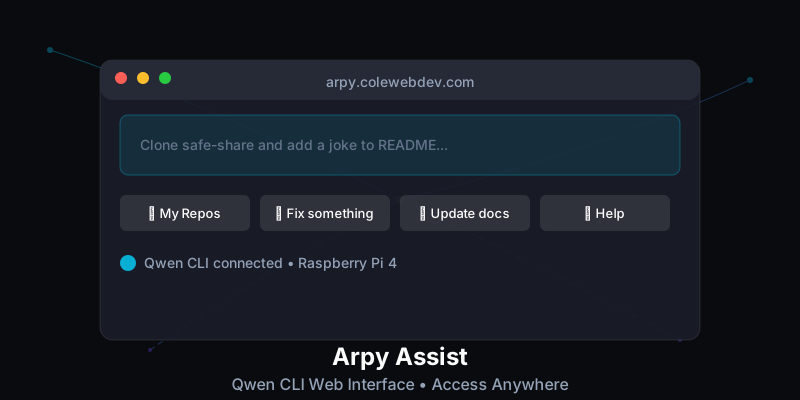
Arpy Assist v1 transformed the command-line Qwen experience into an accessible web application. Instead of typing commands in a terminal, you could interact with Qwen through a clean web interface on any device.
Key Features
- Direct Qwen CLI Chat — Natural conversation interface that proxied input to the Qwen subprocess and streamed output back to the browser
- Smart Buttons — Pre-built prompts for common tasks (list repos, fix a bug, update docs, get help)
- Cloudflare Tunnel — Secure remote access without port forwarding or VPN
- Mobile-Friendly Design — Responsive layout that worked on iPhone without pinching or scrolling around
- YOLO Mode —
--yolo --continueflags passed to Qwen for autonomous, non-interactive execution
How It Was Built
Flask Backend
The backend was a minimal Flask app with two routes: one serving the HTML UI, one accepting POST requests with the user's prompt and streaming Qwen's output back via server-sent events.
from flask import Flask, request, stream_with_context, Response
import subprocess

app = Flask(__name__)

@app.route('/chat', methods=['POST'])
def chat():
    prompt = request.json.get('prompt', '')

    def generate():
        proc = subprocess.Popen(
            ['qwen', '--yolo', '--continue', prompt],
            stdout=subprocess.PIPE,
            stderr=subprocess.STDOUT,
            text=True
        )
        for line in proc.stdout:
            yield f"data: {line}\n\n"

    return Response(stream_with_context(generate()), mimetype='text/event-stream')
Cloudflare Tunnel
Cloudflare Tunnel handles the remote access. The cloudflared daemon runs as a systemd service on the Pi, maintaining a persistent outbound connection to Cloudflare's edge. Incoming requests to the configured hostname are routed through that tunnel to the local Flask app — no inbound firewall rules required.
# /etc/cloudflared/config.yml
tunnel: <your-tunnel-id>
credentials-file: /home/pi/.cloudflared/<tunnel-id>.json

ingress:
  - hostname: arpy.yourdomain.com
    service: http://localhost:5000
  - service: http_status:404
The only thing standing between the public internet and the Flask app was Cloudflare's HTTP Basic Auth (configured at the Cloudflare Access level). For a personal tool on personal hardware, that was sufficient.
Smart Buttons
The smart buttons were hardcoded prompt templates injected into the chat input on click. No server involvement — purely a frontend convenience. Four buttons covered 80% of what I actually used Qwen for day-to-day:
- 📁 My Repos — "List all my GitHub repos and their descriptions"
- 🔧 Fix something — "Review the last error in the logs and suggest a fix"
- 📝 Update docs — "Update the README for the current repo to reflect recent changes"
- ❓ Help — "What can you help me with right now?"
Quick Start
Getting the original version running required only a Python virtual environment and a Qwen CLI installation:
cd /path/to/arpy-assist
python3 -m venv venv
source venv/bin/activate
pip install -r requirements.txt
python web_app.py
Local access was at http://localhost:5000. Remote access via Cloudflare Tunnel at your configured hostname. The config/config.yaml held the model and repo settings:
llm:
  model: "qwen-coder-plus"
  yolo_mode: true
  timeout: 120

repos:
  - your-username/your-repo-1
  - your-username/your-repo-2
What This Version Couldn't Do
The v1 web interface was read-only in a meaningful sense. Qwen would generate code, explain a bug, or draft a README update — but applying those changes still required manual copy-paste into a terminal. The interface had no write access to the filesystem, no git integration, no way to commit or push. It was AI as oracle, not AI as actor.
That limitation drove the next phase of development. If Qwen (and later Claude Code) could tell me exactly what to change and where, why was I still the one making the changes?
The answer to that question is the follow-up post: Arpy Assist Becomes a Coding Agent: Claude Code, Autonomous Commits, and a Pi That Manages Its Own Repos →
Why It Still Matters
Even after the upgrade to a full coding agent, the v1 architecture is worth understanding. The Flask streaming layer, the Cloudflare Tunnel setup, and the smart button system all carried forward. The agent layer was added on top of this foundation, not instead of it. If you're building something similar and don't need full autonomous execution, the v1 pattern — Flask proxy, Cloudflare Tunnel, streamed subprocess output — is a clean starting point.