Where the Site Stood After June
The previous two COLEwebdev.org posts covered the fundamental architecture decisions: running React 18 from CDN with in-browser Babel transpilation, and the set of interactive components (cost estimator, AI showcase, newsletter banner) built entirely on React's built-in hooks. The site was working, fast, and deployable with a single git push to GitHub Pages.
What the site lacked was depth on the AI services side. The AI Studio section existed but described a single category of AI tools — custom-built web applications. The July update changes that by splitting the AI offer into distinct, concrete deliverables that clients can point to and understand.
AI-Powered SEO Audits: Live Data as the Input
The core insight behind the SEO audit offering is that most SEO audits are disconnected from actual performance data. A crawler can tell you a page is missing an H1, but it can't tell you that the page is ranking on page two for a keyword that drives 800 impressions per month — and that a title rewrite might move it to page one.
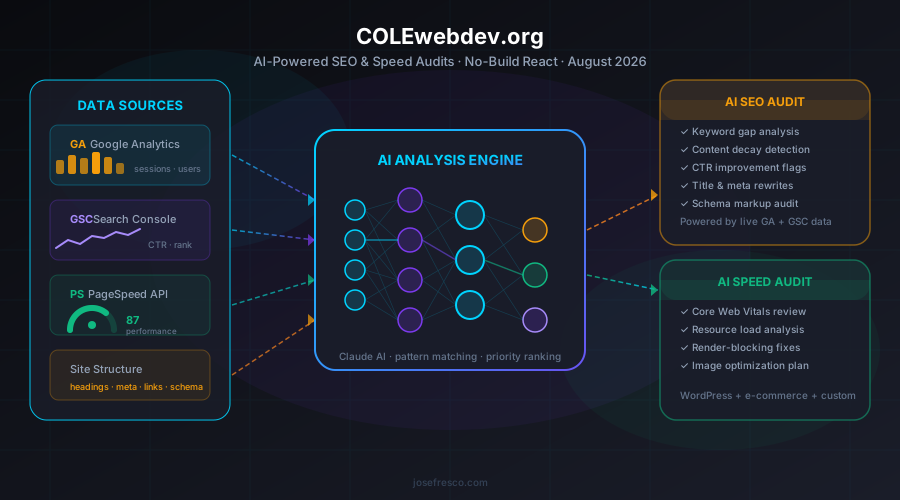
The COLEwebdev.org AI SEO audit works differently. Before the AI generates any recommendations, it ingests the client's live Google Analytics session and user data alongside their Google Search Console click-through rates, average positions, and query impressions. The AI has context about what's actually performing, what's close to a breakout, and what's decaying — not just what the HTML looks like.
From that combined dataset, the audit surfaces five categories of actionable output:
- Keyword gap analysis — queries where impressions are high but CTR is low, indicating the page ranks but the title or meta doesn't match search intent
- Content decay detection — pages where organic sessions have dropped more than 20% quarter-over-quarter, flagged for refresh or consolidation
- CTR improvement flags — specific title and description rewrites ranked by estimated click lift based on competitor positioning in GSC data
- Schema markup audit — structured data gaps against what competitors in the same query clusters are using
- Internal linking opportunities — high-authority pages that aren't passing equity to closely related content
The output is a prioritized action list, not a raw data dump. Each recommendation is tied to a specific URL and an estimated impact tier (high/medium/low) based on current traffic volume and ranking position. That prioritization is what separates an AI audit from a standard crawl report.
Wiring It Into the React Architecture
Adding the SEO audit card to the AI Studio section meant updating ai-apps-page.jsx — a React component that renders a grid of build-type cards, each describing a category of AI application the agency builds.
The card structure is intentionally consistent. Every build type follows the same visual pattern: a colored badge, a one-sentence description, and a list of what the tool does. The SEO audit card got orange branding to visually differentiate it from the existing cards, and its description explicitly calls out GA and GSC data as inputs rather than generic "your website data."
// ai-apps-page.jsx (simplified)
const buildTypes = [
  // ... existing cards ...
  {
    id: 'seo-audit',
    label: 'AI-Powered SEO Audits',
    color: 'orange',
    description: 'AI analysis of your live Google Analytics and Search Console data.',
    features: [
      'Keyword gap analysis from real impressions data',
      'Content decay detection by traffic trend',
      'Title and meta rewrites ranked by CTR lift',
      'Schema markup gap report',
    ],
  },
]
The component change is minimal — a new object in the buildTypes array, a color token, and an updated heading from "Eight types" to "Nine types of custom AI tools." Because the component is pure React running in-browser through Babel Standalone, no build step, no bundler run, and no deployment script is needed. The updated JSX file is served directly, the browser transpiles it on first load, and subsequent loads hit the service worker cache.
The hero tags array on both the AI Studio page and the Cape Cod AI page also got "SEO Audits" added — a one-line change that propagates through the site's React rendering without touching any config file.
AI Speed Audits: Expanding Beyond WordPress
The speed audit expansion started from a gap in the existing service structure. COLEwebdev.org already had a dedicated WordPress speed optimization page — covering Divi, WooCommerce, and WordPress-specific performance patterns. But a meaningful portion of client sites aren't WordPress. E-commerce stores on Shopify or custom platforms, marketing sites built on Next.js or plain HTML, and legacy PHP applications all have speed problems that the WordPress page didn't address.
The new AI Speed Audit offering is explicitly platform-agnostic. The audit starts the same way regardless of what technology the site runs:
- PageSpeed Insights API pull — Lighthouse scores for mobile and desktop, Core Web Vitals breakdown (LCP, INP, CLS), and the specific diagnostics that are failing
- Resource load waterfall analysis — which assets are render-blocking, which third-party scripts are adding latency, and which images aren't sized or compressed correctly
- AI synthesis — mapping the raw Lighthouse findings to prioritized fixes, with implementation guidance specific to the platform the site actually runs on
The platform specificity shows up in the recommendations, not the data collection. A Shopify site with a slow LCP gets different guidance than a Next.js site with the same score — different levers, different constraints, different effort levels. The AI layer handles that translation.
On the implementation side, adding the speed audit to cape-cod-ai-page.jsx required updating the hub card count from four to five and inserting the new card into the grid. The card describes the three-site-type coverage (WordPress, e-commerce, custom-built) explicitly, which is the main marketing message: this isn't a WordPress-only service.
The WordPress speed optimization page got a complementary update — a cross-link nudge at the bottom of the page directing non-WordPress visitors to the AI Studio. If someone lands on the WordPress speed page through organic search and their site isn't WordPress, they now have a clear path to the right offering instead of a dead end.
Five New Service Pages: Filling Content Gaps
The August 1 batch of commits added five new service pages targeting keyword clusters that the existing site wasn't covering:
- Google Business Profile optimization — local SEO clients often arrive asking about GBP specifically, and a dedicated page converts that intent better than a buried paragraph on the marketing services page
- Website redesign services — a common entry point for clients who've outgrown their current site and need a full rebuild rather than incremental improvements
- Three additional location and industry-specific pages targeting Cape Cod keyword combinations that keyword research identified as high-intent, low-competition
Each new page follows the same HTML shell pattern used across the site: minimal boilerplate, a JSX component file that React renders in-browser, and no build pipeline. The pages were wired into the navigation, search index, and sitemap in the same commit that created the HTML shells — a process that took one commit to set up rather than requiring a separate deployment step.
The Cape Cod keyword strategy is intentional. The site targets a specific geographic and industry intersection — web development and digital marketing for Cape Cod businesses — and the content gap pages extend that coverage into subtopics (GBP optimization, redesigns, industry verticals) that local clients search for independently of the main service terms.
The Bulk SEO Pass: 70 Pages in One Sprint
The August 1 commit logs include several rounds of SEO fixes that touched roughly 70 pages across the site. The fixes fell into three categories:
Title length corrections. Google truncates titles beyond roughly 60 characters in search results. A number of pages had titles in the 70-80 character range that were being cut off mid-phrase in the SERPs. The fix was mechanical: trim each title to the keyword-forward phrase that fits within the limit, without losing the primary keyword.
Description length corrections. Meta descriptions beyond 155-160 characters get truncated in most search snippets. Pages with 200+ character descriptions were condensed to the most compelling sentence — the one that matches what the page delivers, not a full paragraph summary.
Schema markup completeness. The site uses LocalBusiness schema on most pages and Service schema on service pages. The bulk pass added missing areaServed properties, corrected serviceType values that didn't match the page content, and resolved one marketing page that had a duplicate schema block from an earlier edit.
The marketing page also got a canonical URL fix that resolved a duplicate content signal — the marketing page and a closely related page were sharing enough content structure that search engines were uncertain which to rank. Differentiating the content and adding the canonical resolved the ambiguity.
Cross-Page Linking: Town and Industry Pages
One of the subtler August 1 changes was expanding the internal linking between the town-specific pages and the industry-specific pages. COLEwebdev.org has a grid of pages targeting combinations like "Cape Cod restaurant web design" and "Brewster small business website" — town pages and industry pages that should logically link to each other.
The fix added cross-links from each industry page to its most relevant town pages, and vice versa. These aren't navigation links — they're contextual mentions within the page content, pointing to related combinations a local visitor might want. A restaurant owner in Chatham who lands on the restaurant web design page now sees a direct link to the Chatham-specific page rather than having to navigate back through the main menu.
This kind of internal linking is effective specifically because the pages are thematically close. Each link reinforces the topical cluster Google uses to understand what the site is about, and each internal link passes some ranking equity from pages that are already indexed to pages that are newer or thinner.
Why the No-Build Architecture Holds Up
Every change described in this post — new service cards, new JSX components, new HTML pages, schema updates, meta tag corrections — shipped without running a build command. The workflow is:
# Edit the JSX file
vim ai-apps-page.jsx

# Push to GitHub Pages
git add ai-apps-page.jsx ai-apps.html
git commit -m "feat: add AI SEO audit card to build types"
git push
GitHub Pages serves the updated file. On the next browser load, Babel Standalone in the browser transpiles the JSX. The service worker caches the result. Subsequent visitors hit the cache. There's no CI pipeline to configure, no build artifact to manage, and no environment variables to coordinate between local and production.
The tradeoff — and it's a real one — is that in-browser transpilation adds a few hundred milliseconds to first-load time for uncached visitors. That cost is acceptable for a marketing site where SEO performance (controlled by meta tags, schema, and content quality) matters more than Time to Interactive milliseconds. For an app that users return to repeatedly, the calculus would be different.
The site has now accumulated 269 commits on this architecture without hitting a scenario that would force a migration to a build step. New pages follow the same pattern as old ones. New components are new JSX files. The cognitive overhead stays near zero, which means time goes into the content and the service offerings rather than into tooling.
What This Update Signals
The addition of AI SEO and speed audits as distinct service offerings reflects a real shift in how web development agencies need to position AI capabilities. Clients don't want to hear that an agency "uses AI" — they want to know what specific problem the AI solves and what the output looks like. Framing the SEO audit as "AI analysis of your live GA and GSC data" is more concrete than "AI-powered digital marketing."
The five new service pages and the 70-page SEO sprint are the less glamorous side of the same effort — making sure the right people can find the site for the right queries before they see the AI offerings. The AI Studio section only converts if the right traffic arrives in the first place.
The full repository is at github.com/josefresco/COLEwebdev.org.