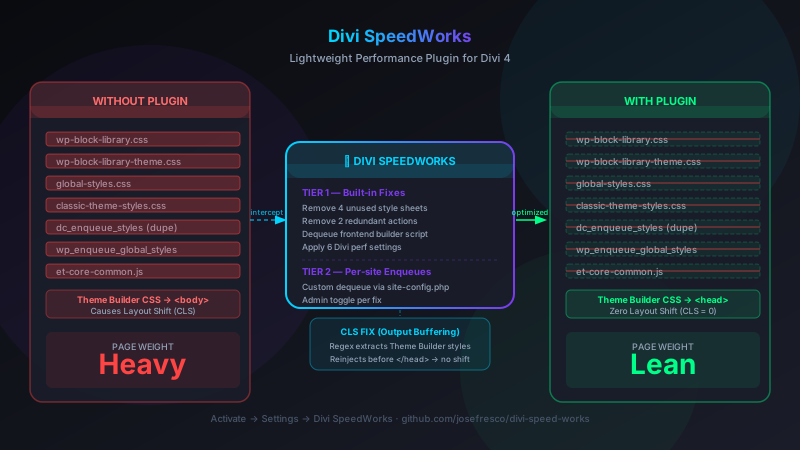
</head> so they load before first paint. All fixes toggle individually in WP Admin → Settings → Divi SpeedWorks, and a Tier 2 system lets you add site-specific custom dequeues through a config file.
The Problem With Divi Out of the Box
Divi is one of the most popular WordPress themes — and for good reason. The visual builder is powerful, the Theme Builder gives you global header, footer, and template control, and the page-building experience is genuinely fast once you know your way around it.
But what Divi ships by default is a different story. Activate Divi on a fresh WordPress install and your frontend page loads carry a set of assets that don't belong there: Gutenberg block editor stylesheets (you're not using Gutenberg), WordPress core global styles (overridden by Divi anyway), duplicate CSS enqueues from child theme hooks, and an admin-only Divi builder script that fires on every public page for no reason.
None of these are catastrophic individually. But they compound. A PageSpeed Insights run on a typical Divi 4 site will flag render-blocking resources, unused CSS, and a Cumulative Layout Shift score above zero — all attributable to how Divi's enqueue stack interacts with WordPress core. These are fixable problems, and fixing them doesn't require a managed performance suite or a CDN subscription. It requires knowing which hooks to call and which styles to dequeue.
Divi SpeedWorks packages those fixes into a plugin that activates clean and requires no configuration for the common case.
The Two-Tier Architecture
The plugin is organized into two tiers that reflect two different categories of performance fix:
Tier 1 contains hardcoded optimizations that are safe across every Divi 4 installation. These are fixes for things Divi does wrong by default — shipping assets that have no business being on a Divi-powered frontend. Tier 1 runs automatically when the plugin is active, without reading a config file or checking site-specific state.
Tier 2 handles per-site enqueue cleanup. Every WordPress site accumulates plugin scripts and stylesheets that load globally but aren't needed on every page — a contact form plugin loading its validation JS on a blog post, a gallery plugin loading lightbox CSS on the homepage. Tier 2 gives you a structured way to register those dequeues once, in a config file, and have them applied automatically on every frontend request.
The CLS fix sits outside both tiers. It's a separate class (DSW_CLS_Fix) that uses output buffering to address a specific Divi Theme Builder behavior. Because it touches the entire HTML output rather than the enqueue stack, it's architecturally distinct from the dequeue-based fixes in Tiers 1 and 2.
Tier 1: The Seven Built-in Fixes
The DSW_Built_In_Fixes class defines nine optimizations (with some targeting the same resource via multiple hooks). Here's what each one removes and why it shouldn't be there:
1. Remove dc_enqueue_styles
Some Divi child themes call dc_enqueue_styles() in their functions.php to enqueue the parent theme's stylesheet alongside a child stylesheet. This is a common pattern from the pre-Divi-4 era, but in Divi 4, it causes the parent theme CSS to load twice — once via Divi's own enqueue and once via the child theme's explicit call. The fix removes the dc_enqueue_styles action entirely, letting Divi handle its own stylesheet loading.
2. Remove wp_enqueue_global_styles
WordPress core outputs a <style> block of "global styles" tied to the block editor's design system — custom color palettes, spacing presets, typography settings. On a Divi site, these global styles serve no purpose because Divi manages all of that through its own options system. The fix removes wp_enqueue_global_styles from both wp_enqueue_scripts and wp_footer, which is where WordPress sneaks a fallback copy in on some theme configurations.
3–6. Dequeue Gutenberg Stylesheets
Activating WordPress core ships four block-editor stylesheets that load on every page, even when you've never touched the block editor:
wp-block-library— Base block styles for paragraphs, images, headings, etc.wp-block-library-theme— Theme-specific block style variantsglobal-styles— The computed stylesheet from the site editor's global styles panelclassic-theme-styles— Fallback styles WordPress adds when the active theme doesn't declare block support
Divi 4 doesn't use any of these. Its own builder output replaces them entirely. The plugin dequeues and deregisters all four on wp_enqueue_scripts at priority 100, after WordPress has finished registering them.
7. Dequeue et-core-common
et-core-common is Elegant Themes' shared JavaScript library — it powers inline editing, drag-and-drop builder controls, and other visual editing features. None of those are needed on a public-facing frontend page. Divi enqueues it everywhere by default rather than gating it to admin or builder contexts. The plugin dequeues it on wp_enqueue_scripts so it never loads on frontend page requests.
Each of these seven fixes is individually toggleable from the settings page. If one causes a conflict on a specific site — an unusual child theme that actually depends on dc_enqueue_styles, for example — you can disable that fix without rolling back the others.
How the Built-in Fixes Are Applied
The implementation in DSW_Built_In_Fixes is straightforward. The class defines a FIXES constant that maps each fix identifier to its type (remove_action, dequeue_style, or dequeue_script) and its WordPress hook target:
const FIXES = [
    'dc_enqueue_styles'           => ['type' => 'remove_action', 'hook' => 'wp_head'],
    'wp_enqueue_global_styles'    => ['type' => 'remove_action', 'hook' => 'wp_enqueue_scripts'],
    'wp-block-library'            => ['type' => 'dequeue_style'],
    'wp-block-library-theme'      => ['type' => 'dequeue_style'],
    'global-styles'               => ['type' => 'dequeue_style'],
    'classic-theme-styles'        => ['type' => 'dequeue_style'],
    'et-core-common'              => ['type' => 'dequeue_script'],
];
On initialization, the class iterates the FIXES array, checks whether each fix is enabled via the dsw_built_in_fix_overrides database option, and either calls remove_action() or hooks a wp_dequeue_style() / wp_dequeue_script() call at the right priority. The is_enabled() check defaults to true for every fix — opt-out rather than opt-in.
The CLS Fix: Output Buffering to Move Styles to <head>
The CLS fix addresses a specific behavior in Divi's Theme Builder. When you create a global page template, header, or footer in the Theme Builder, Divi injects the template's module CSS as an inline <style> block directly into the page body — not the <head>. It looks like this in the rendered HTML:
<body>
  <!-- page content begins... -->
  <style id="et-builder-module-design-header-cached-inline-styles">
    /* theme builder template CSS */
    .et_pb_section { ... }
    .et_pb_row { ... }
  </style>
  <!-- more content... -->
</body>
The browser sees the page structure before it sees the styles that govern that structure. Under normal network conditions this might not be noticeable. Under throttled conditions — a mobile network, a slow connection, or just a server under load — the browser renders content with default styles first, then reflows when the inline stylesheet arrives. That reflow is Cumulative Layout Shift. It's not hypothetical; it shows up as a non-zero CLS score in PageSpeed Insights on virtually every Divi Theme Builder site.
How the Fix Works
The DSW_CLS_Fix class uses PHP output buffering to intercept the complete HTML response before it's sent to the browser:
add_action('template_redirect', function() {
    ob_start([$this, 'process_output']);
}, 1);  // Priority 1 — starts before Divi outputs anything
The process_output() callback receives the complete HTML string as its argument. It runs a preg_match_all() to find all <style> blocks whose IDs match the Divi Theme Builder pattern:
preg_match_all(
    '/]+id="et-builder-module-design-[^"]*-cached-inline-styles"[^>]*>.*?<\/style>/si',
    $html,
    $matches
);
The regex captures both the standard variant (et-builder-module-design-*-cached-inline-styles) and any deferred variants Divi might generate. Each matched block is removed from its original location in the body using str_replace(), then all captured blocks are concatenated and injected immediately before </head>:
$injected_styles = implode("\n", $matches[0]);
$html = str_replace('', $injected_styles . "\n", $html);
return $html;
The result: the browser receives all layout-critical CSS in <head> before parsing the body. It can compute the correct layout on the first pass without any reflow. CLS drops to zero.
Guards and Safety Checks
The CLS fix has three automatic disablement conditions:
- Admin context: The fix skips
is_admin()requests. Running output buffering in the admin would interfere with the Divi builder's own live editor output. - REST API requests: Buffering REST responses would corrupt JSON output. The fix checks
defined('REST_REQUEST')and exits early. - Manual override: Setting
dsw_disable_cls_fixto'yes'in the database disables the buffer entirely, reachable via the settings page toggle.
Tier 2: Per-Site Custom Dequeues
Every WordPress site accumulates its own specific set of unnecessary global assets. A booking plugin loads its calendar stylesheet on the homepage. A forms plugin loads its conditional logic JavaScript on posts. A slider plugin loads its library on pages that don't have sliders.
Divi SpeedWorks handles this through site-config.php, a configuration file that the plugin reads to register site-specific dequeues. You add entries there once and they're applied on every frontend page load from that point on:
return [
    'dequeue_styles' => [
        'woocommerce-general',       // WooCommerce styles on non-shop pages
        'yoast-seo-frontend',        // Yoast SEO frontend CSS
        'contact-form-7',            // CF7 styles on pages without forms
    ],
    'dequeue_scripts' => [
        'wc-cart-fragments',         // WooCommerce cart fragments AJAX (if not using cart)
        'jquery-blockui',
    ],
];
The DSW_Enqueue_Fixes class reads this config and hooks the dequeues at wp_enqueue_scripts priority 999, after all plugins have finished their own enqueue calls. If a specific script or style isn't registered on a given page, the dequeue call is a no-op — it won't throw an error for an asset that wasn't present to begin with.
This system gives you the benefits of a per-site performance audit without having to remember which plugin added which asset or which hook to target — you define the list once and the plugin handles it on every load.
The Admin Settings Interface
All of the plugin's toggles are accessible from WP Admin → Settings → Divi SpeedWorks. The page is intentionally minimal — a set of checkboxes, one per Tier 1 fix, plus a toggle for the CLS fix. Each checkbox maps directly to a value in the dsw_built_in_fix_overrides option.
The admin panel is registered through DSW_Admin, which adds a submenu page under Settings and handles option saves via the standard WordPress Settings API. No custom REST endpoints, no AJAX handlers — just the settings form pattern that WordPress has supported since version 2.0.
The settings page also shows your current Divi version and PHP version in a small environment block at the bottom, so you can confirm the plugin's minimum requirements are met without leaving the page.
Divi Performance Settings Applied at Activation
On activation, Divi SpeedWorks writes six Divi-native performance settings into the et_divi options array via DSW_Divi. These are settings that Elegant Themes provides but doesn't enable by default:
- Static CSS generation: Pre-generates the compiled Divi stylesheet as a static file instead of computing it on each request.
- Critical CSS: Enables Divi's above-the-fold CSS extraction.
- Deferred JS: Moves non-critical Divi scripts below the fold.
- Dynamic CSS: Loads only the module-specific CSS for modules actually used on each page.
- Lazy loading images: Adds the native
loading="lazy"attribute to images below the fold. - Limit post revisions: Reduces database bloat from the Divi builder's aggressive auto-save behavior.
These settings are written once at activation and don't run on every page load. If you've already configured Divi performance settings manually, the plugin will write its defaults on first activation — you can adjust any of them afterward through the normal Divi Theme Options panel.
What the Plugin Does Not Do
Divi SpeedWorks is intentionally scoped to what can be fixed universally, without knowing anything about a specific site's content or traffic patterns. It does not:
- Cache pages or serve cached HTML
- Minify or concatenate CSS and JavaScript
- Configure CDN delivery or asset prefetching
- Optimize images beyond enabling Divi's native lazy loading flag
- Manage database cleanup or revision limits beyond the initial activation write
For those tasks, a dedicated caching plugin (WP Rocket, W3 Total Cache, LiteSpeed Cache) handles them better than any general plugin can. Divi SpeedWorks is not a replacement for those tools — it's the set of Divi-specific fixes those tools don't know to apply.
Installation
The plugin is a standard WordPress plugin. No Composer, no build step:
# Download the plugin
git clone https://github.com/josefresco/divi-speed-works.git

# Copy to your WordPress plugins directory
cp -r divi-speed-works /path/to/wp-content/plugins/

# Or zip it and upload via WP Admin → Plugins → Add New → Upload Plugin
After activation, visit Settings → Divi SpeedWorks to review the enabled fixes. The defaults are safe for any standard Divi 4 installation with no child theme overrides — if you're running a custom child theme, check whether it relies on dc_enqueue_styles() before leaving that fix enabled.
For Tier 2 dequeues, edit site-config.php in the plugin directory to add site-specific scripts and styles you want to remove. The format is a PHP array return as shown in the configuration section above.
Who This Is For
If you're managing a Divi 4 site and running into PageSpeed Insights flags for unused CSS, render-blocking resources, or a CLS score above zero — and you'd rather fix those with a targeted plugin than a general-purpose performance suite — Divi SpeedWorks gives you the Divi-specific fixes in one place.
It's also useful as a reference if you're writing your own Divi performance customizations. The DSW_Built_In_Fixes class documents exactly which handles to dequeue and at which priority. The DSW_CLS_Fix class demonstrates the output buffering pattern for intercepting and rewriting page HTML before it's sent — a technique that applies beyond CLS fixes to any scenario where you need to transform the final HTML response in PHP.
The full project is at github.com/josefresco/divi-speed-works. Version 1.1.0 requires WordPress 5.6+, PHP 7.4+, and Divi 4.x.