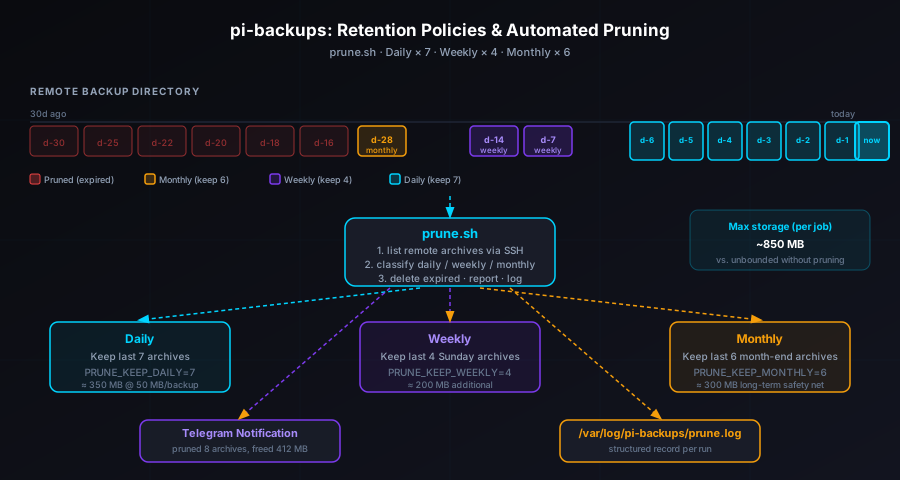
prune.sh — a script that lists every archive in your remote backup directory, classifies each one as daily, weekly, or monthly using its timestamp, deletes anything outside your configured retention windows, reports the freed space via Telegram using the existing tg_notify() function, and appends a structured record to /var/log/pi-backups/prune.log. Configure three numbers in .env (PRUNE_KEEP_DAILY, PRUNE_KEEP_WEEKLY, PRUNE_KEEP_MONTHLY) and add a single weekly cron entry. From that point on, your remote backup directory stays within a predictable storage budget without you thinking about it.
The Storage Problem That Grows Quietly
The original pi-backups release transferred a nightly archive to a remote host over SSH. The April update added GPG encryption. The June update added Telegram alerts and a weekly health digest. The July 21st update added monthly restore drills to prove a recovery would actually work.
Each of those updates made the system more robust. But none of them touched the remote directory where archives accumulate. A nightly backup job producing a 50 MB archive generates roughly 1.5 GB per month, 18 GB per year, per job. Run two or three jobs and that's 50 GB or more sitting on a remote host, most of it redundant — you don't need 180 daily snapshots of the same data to be safe, and keeping them isn't free.
The solution is a retention policy: keep enough archives to give you meaningful recovery options at different time horizons, and automatically delete everything beyond that.
The Grandfather-Father-Son Model
The retention scheme in prune.sh is a variant of the classic grandfather-father-son (GFS) rotation used by enterprise backup systems for decades. The idea is to keep archives at three different granularities:
- Daily (son): The most recent N daily archives. For most self-hosted Pi applications, 7 days is enough to catch a misconfiguration or accidental deletion you didn't notice immediately.
- Weekly (father): One archive per week, kept for W weeks. This is the middle tier — useful for recovering from a problem that wasn't caught within the first week (a slow data corruption, a bug that landed two Wednesdays ago).
- Monthly (grandfather): One archive per month, kept for M months. The long-term safety net. Useful for recovering from something that only became apparent months later — a silent schema migration that mangled data you rarely touched.
The GFS model gives you 7 + 4 + 6 = 17 recovery points for a family-dash-scale job instead of 180. The storage footprint drops from 9 GB per month (if you never prune) to roughly 850 MB total (capped, stable forever).
Archive Naming Convention
For the classification logic to work, archives need timestamps in their filenames. The backup.sh script in pi-backups already produces archives named with an ISO 8601 date:
family-dash.2026-07-27.tar.gz.gpg
family-dash.2026-07-26.tar.gz.gpg
family-dash.2026-07-20.tar.gz.gpg
family-dash.2026-07-13.tar.gz.gpg
family-dash.2026-06-30.tar.gz.gpg
...
prune.sh parses the YYYY-MM-DD segment from each filename and uses it to determine which retention tier the archive belongs to. No stat calls, no filesystem metadata — just the filename, which means the classification works correctly even if an archive was rsynced to a new destination where timestamps were reset.
The prune.sh Script
Here's an abridged version of the script showing the core logic:
#!/usr/bin/env bash
set -euo pipefail
source "$(dirname "$0")/.env"

JOB_NAME="${1:?Usage: prune.sh <job-name>}"
REMOTE_DIR="${REMOTE_USER}@${REMOTE_HOST}:${REMOTE_PATH}"

# --- Collect all archives for this job ---
mapfile -t ALL_ARCHIVES < <(
    ssh "${REMOTE_USER}@${REMOTE_HOST}" \
        "ls ${REMOTE_PATH}/${JOB_NAME}.*.tar.gz.gpg 2>/dev/null" \
    | sort -r
)

[[ ${#ALL_ARCHIVES[@]} -eq 0 ]] && { echo "No archives found."; exit 0; }

# --- Classify each archive ---
TODAY=$(date +%s)
declare -a KEEP=()
declare -a PRUNE=()

DAILY_COUNT=0
declare -A WEEKLY_SEEN   # key = year-weeknum
declare -A MONTHLY_SEEN  # key = year-month

for archive in "${ALL_ARCHIVES[@]}"; do
    # Extract date from filename: jobname.YYYY-MM-DD.tar.gz.gpg
    date_str=$(basename "${archive}" | grep -oP '\d{4}-\d{2}-\d{2}')
    archive_epoch=$(date -d "${date_str}" +%s 2>/dev/null) || continue

    age_days=$(( (TODAY - archive_epoch) / 86400 ))
    week_key=$(date -d "${date_str}" +%G-%V)   # ISO year + week number
    month_key=$(date -d "${date_str}" +%Y-%m)

    keep=false

    # Tier 1: daily — keep the N most recent
    if [[ ${DAILY_COUNT} -lt ${PRUNE_KEEP_DAILY} ]]; then
        keep=true
        (( DAILY_COUNT++ ))
    # Tier 2: weekly — keep one per week for W weeks
    elif [[ -z "${WEEKLY_SEEN[${week_key}]+x}" ]] \
         && [[ ${#WEEKLY_SEEN[@]} -lt ${PRUNE_KEEP_WEEKLY} ]]; then
        keep=true
        WEEKLY_SEEN["${week_key}"]=1
    # Tier 3: monthly — keep one per month for M months
    elif [[ -z "${MONTHLY_SEEN[${month_key}]+x}" ]] \
         && [[ ${#MONTHLY_SEEN[@]} -lt ${PRUNE_KEEP_MONTHLY} ]]; then
        keep=true
        MONTHLY_SEEN["${month_key}"]=1
    fi

    if $keep; then
        KEEP+=("${archive}")
    else
        PRUNE+=("${archive}")
    fi
done
The loop iterates archives from newest to oldest (the sort -r above) and fills the daily bucket first, then the weekly bucket, then the monthly bucket. An archive can only land in one tier. Anything that doesn't fit in any tier goes into PRUNE.
Deleting Expired Archives
Once the classification pass is complete, the deletion step is a single SSH call:
# --- Delete pruned archives ---
PRUNED_COUNT=0
PRUNED_SIZE_KB=0

if [[ ${#PRUNE[@]} -gt 0 ]]; then
    for archive in "${PRUNE[@]}"; do
        # Measure size before deleting
        size_kb=$(ssh "${REMOTE_USER}@${REMOTE_HOST}" \
            "du -k \"${archive}\" | awk '{print \$1}'")
        PRUNED_SIZE_KB=$(( PRUNED_SIZE_KB + size_kb ))

        ssh "${REMOTE_USER}@${REMOTE_HOST}" "rm -f \"${archive}\""
        (( PRUNED_COUNT++ ))
    done
fi

PRUNED_SIZE=$(( PRUNED_SIZE_KB / 1024 )) # in MB
Each archive is measured before deletion so the Telegram report can show how much space was freed. The rm -f flag suppresses errors on already-absent files — this makes the script idempotent, so running it twice in a row is safe.
Reporting and Logging
After deletion, two things happen: a Telegram notification via the existing tg_notify() function from the June update, and a log entry appended to /var/log/pi-backups/prune.log:
# --- Notify ---
if [[ ${PRUNED_COUNT} -gt 0 ]]; then
    tg_notify "🗑️ <b>Prune complete</b>

Job:     ${JOB_NAME}
Removed: ${PRUNED_COUNT} archive(s)
Freed:   ${PRUNED_SIZE} MB
Kept:    ${#KEEP[@]} archive(s)
Policy:  daily×${PRUNE_KEEP_DAILY} weekly×${PRUNE_KEEP_WEEKLY} monthly×${PRUNE_KEEP_MONTHLY}"
else
    tg_notify "✅ <b>Prune: nothing to remove</b>

Job:   ${JOB_NAME}
Kept:  ${#KEEP[@]} archive(s) (within policy)"
fi

# --- Log ---
echo "$(date -Iseconds) ${JOB_NAME} pruned=${PRUNED_COUNT} freed=${PRUNED_SIZE}MB kept=${#KEEP[@]}" \
    >> /var/log/pi-backups/prune.log
If there's nothing to prune — which will be the case for the first few weeks after enabling it — the script sends a clean "nothing to remove" confirmation rather than going silent. Silence from an automated script is often indistinguishable from a crash, so an explicit "ran and found nothing" message is worth the character count.
Configuring Retention in .env
Three new variables control the retention windows. Add them to the existing .env file for each job:
# Retention policy (add to .env for each job)
PRUNE_KEEP_DAILY=7      # Keep this many daily archives
PRUNE_KEEP_WEEKLY=4     # Keep one archive per week, this many weeks back
PRUNE_KEEP_MONTHLY=6    # Keep one archive per month, this many months back
The defaults above give you 7 daily recovery points, 4 weekly points, and 6 monthly points. For a small application like family-dash at ~50 MB per archive, that's roughly 850 MB total storage on the remote host — stable forever, not growing each day.
If your backups are larger or your storage is more constrained, reduce the windows. If you need more granular weekly recovery for a high-change application, increase PRUNE_KEEP_WEEKLY. The numbers are intentionally separate so you can tune each tier independently.
How Weekly and Monthly Archives Are Selected
The weekly tier keeps one archive per ISO week number. So if you have archives from July 21, July 22, and July 23 (all in week 30), only the July 23 archive survives as the week-30 representative — the others expire once they fall outside the daily window. The archive that "wins" is always the most recent within that week, because the loop iterates newest-first.
The monthly tier works the same way: one archive per calendar month, newest-first. The archive from July 31 wins over July 30 for the July monthly slot. This means month-end archives tend to be selected naturally, without any special cron timing.
One edge case worth knowing: if you ran backup.sh multiple times in a day and have multiple archives with the same date, they're treated as the same day for retention purposes. Only the first one encountered (newest by file listing sort) fills the daily slot; duplicates are pruned. This shouldn't come up in normal operation but it's useful to know if you ever ran a manual backup mid-day.
Scheduling Prune Runs
Pruning once a week after the nightly backup is enough. A Saturday run is a reasonable default — it catches the full prior week of dailies and confirms the weekly retention tier is populated:
# Existing: nightly backup at 02:00
0 2 * * * /opt/pi-backups/backup.sh family-dash

# New: weekly prune on Saturday at 03:00 (after backup completes)
0 3 * * 6 /opt/pi-backups/prune.sh family-dash
Multiple jobs get separate prune entries, staggered to avoid concurrent SSH connections to the same remote host:
0 3 * * 6 /opt/pi-backups/prune.sh family-dash
30 3 * * 6 /opt/pi-backups/prune.sh watch-list
0 4 * * 6 /opt/pi-backups/prune.sh pi-config
You can run prune more frequently without harm — the idempotent deletion means running it daily would just confirm nothing to remove most days, with actual deletions only happening after the daily window is full (after day 7). Weekly is the practical choice because it keeps the Telegram notifications meaningful rather than becoming background noise.
Running Your First Prune
Pull the update, add the retention variables to .env, then run a dry pass before committing to the cron:
# Pull the latest version
git pull origin main

# Add retention config to .env
cat >> .env <<'EOF'
PRUNE_KEEP_DAILY=7
PRUNE_KEEP_WEEKLY=4
PRUNE_KEEP_MONTHLY=6
EOF

# Dry run — preview what would be pruned (prints keep/prune lists, no deletions)
bash prune.sh --dry-run family-dash

# If the output looks right, run for real
bash prune.sh family-dash

# Add the weekly cron
(crontab -l; echo "0 3 * * 6 /opt/pi-backups/prune.sh family-dash") | crontab -
The --dry-run flag prints the full keep list and prune list without touching anything on the remote host. Review what the first run would delete before letting it proceed — especially important if you have archives going back months that you want to verify are being classified correctly.
Storage Projection: Before and After
The difference between "never prune" and "GFS retention" becomes significant quickly. For a family-dash backup job producing a 54 MB archive nightly:
| Scenario | After 1 month | After 6 months | After 1 year |
|---|---|---|---|
| No pruning | 1.6 GB | 9.7 GB | 19.3 GB |
| GFS retention (7/4/6) | ~500 MB | ~850 MB | ~850 MB |
After the monthly tier fills up (6 months in), storage stabilizes at the maximum window size and stays there. You're not paying for storage you can't use — the oldest monthly archive rotates out as a new one comes in.
Interaction with the Weekly Digest
The digest.sh script added in the June update sends a weekly summary of all backup runs. Starting with this update, the digest also reads from prune.log and includes a pruning section in the weekly report:
📊 <b>Weekly Backup Digest</b>

Period: Mon Jul 21 – Sun Jul 27

Backups (7 runs):
  ✅ family-dash: 7/7 succeeded · avg 38s · avg 54 MB
  ✅ watch-list:  7/7 succeeded · avg 22s · avg 18 MB

Prune (1 run, Sat Jul 26):
  family-dash: removed 6 archives, freed 312 MB
  watch-list:  removed 4 archives, freed 68 MB

Restore drill: next on Aug 1
The digest integration means you get the pruning summary as part of the weekly report you were already reading, rather than as a separate Saturday notification buried in your Telegram history.
What This Update Ships
- prune.sh: The main pruning script. Lists remote archives via SSH, classifies each as daily/weekly/monthly using the filename timestamp, deletes expired archives, reports freed space via Telegram, and logs to
/var/log/pi-backups/prune.log. Accepts--dry-runto preview without deleting. - Three retention tiers: Daily (keep N most recent), weekly (keep one per week for W weeks), monthly (keep one per month for M months). All three are configurable in
.env. - Idempotent deletion:
rm -fmakes double-runs safe. Running prune twice never deletes more than the first run did. - digest.sh integration: The weekly digest now includes a pruning section pulled from
prune.log, so you see backup health and storage management in a single weekly report. - Dry-run mode: Pass
--dry-runto see exactly which archives would be kept and which would be deleted before your first live run.
The Full pi-backups Stack
After five updates, pi-backups covers the complete lifecycle of a self-hosted Pi backup system — from the initial transfer to long-term storage management:
- March 2026: rsync foundation — nightly transfers to a remote host over SSH.
- April 2026: GPG encryption — AES-256 encrypted archives and checksum verification.
- June 2026: Telegram alerts — per-run notifications and a weekly health digest.
- July 21, 2026: Restore drills — monthly automated proof that a real restore would succeed.
- July 28, 2026: Retention policies — GFS pruning that keeps storage bounded and stable forever.
The full project is at github.com/josefresco/pi-backups. If you're starting fresh, begin with the rsync foundation and layer each addition when it becomes relevant to your setup.