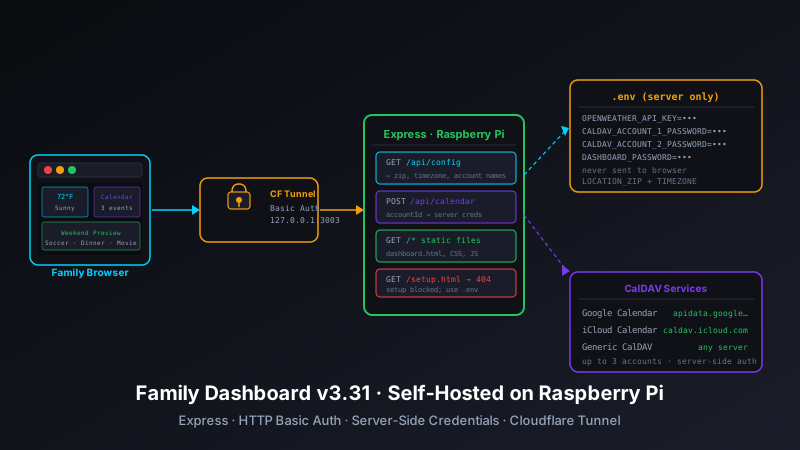
/api/config endpoint feeds safe config to the client at startup. HTTP Basic Auth gates the whole thing. Along the way: a subtle timezone double-shift bug that only appeared on the Pi (not Vercel), and a round of UI cleanup to strip colored borders and leftover panel backgrounds.
Why Leave Vercel?
Family Dashboard has run on Vercel since v3.23, when CalDAV calendar support was first added. The serverless function in api/calendar.js acted as a proxy — the browser sent CalDAV credentials to Vercel, Vercel forwarded the request to Google Calendar or iCloud, and the response came back. It worked, but it had an uncomfortable property: the CalDAV credentials (including Gmail app passwords) lived in the browser's localStorage.
That's not catastrophic for a personal-use app on your home network, but it's the kind of thing that nags. Any JavaScript running on the page could read those credentials. A misconfigured CSP, a bad browser extension, a cross-site scripting edge case — localStorage is not a secrets store.
The other reason is consolidation. The Pi already runs several services behind a Cloudflare Tunnel. Adding family-dash to that stack means one fewer external dependency, no Vercel billing surprises if usage spikes, and full control over the runtime environment. The tradeoff — maintaining a Node.js process on the Pi — is negligible.
The Express Server
The core of v3.31 is server.js, a straightforward Express application. It handles three things: serving static files, proxying CalDAV requests, and pushing configuration to the client.
const express = require('express');
const basicAuth = require('express-basic-auth');
require('dotenv').config();

const app = express();
const PORT = process.env.PORT || 3003;

app.use(basicAuth({
    users: { [process.env.DASHBOARD_USERNAME]: process.env.DASHBOARD_PASSWORD },
    challenge: true,
    realm: 'Family Dashboard'
}));

app.use(express.json());
app.use(express.static('.'));

app.get('/api/config', (req, res) => { /* ... */ });
app.post('/api/calendar', calendarRoute);
app.get('/setup.html', (req, res) => res.sendStatus(404));

app.listen(PORT, '127.0.0.1', () => {
    console.log(`Family Dashboard running at http://127.0.0.1:${PORT}`);
});
A few things worth noting. The server binds to 127.0.0.1 — it only accepts connections from localhost. The public-facing entry point is the Cloudflare Tunnel, which handles TLS and sits in front of a reverse proxy (nginx or the tunnel daemon directly). Nothing about the Express server itself is exposed to the internet.
HTTP Basic Auth is a shared family password, not per-user accounts. That's appropriate here. The goal is "keep it off the public internet," not "authenticate individual family members." The browser prompts once and remembers the credentials.
Moving Credentials Off the Client
Previously, the CalDAV setup flow stored credentials in localStorage under keys like caldav_account_1_username and caldav_account_1_password. The client would read them and send them to the Vercel proxy on each calendar fetch.
In v3.31, credentials live in .env on the Pi:
DASHBOARD_USERNAME=family
DASHBOARD_PASSWORD=yourpassword

OPENWEATHER_API_KEY=abc123

CALDAV_ACCOUNT_1_NAME=Family Calendar
CALDAV_ACCOUNT_1_URL=https://caldav.icloud.com
CALDAV_ACCOUNT_1_USERNAME=user@icloud.com
CALDAV_ACCOUNT_1_PASSWORD=app-specific-password

CALDAV_ACCOUNT_2_NAME=Work Calendar
CALDAV_ACCOUNT_2_URL=https://apidata.googleusercontent.com/caldav/v2
CALDAV_ACCOUNT_2_USERNAME=user@gmail.com
CALDAV_ACCOUNT_2_PASSWORD=gmail-app-password
The client never sees passwords. When the dashboard needs to fetch a calendar, it sends an accountId (e.g., "1" or "2") to POST /api/calendar. The server looks up the matching credentials from its environment variables and makes the CalDAV request server-side:
// Before (v3.30): client sends credentials
fetch('/api/calendar', {
    method: 'POST',
    body: JSON.stringify({
        url: account.url,
        username: account.username,
        password: account.password  // sent over the wire
    })
});

// After (v3.31): client sends only an ID
fetch('/api/calendar', {
    method: 'POST',
    body: JSON.stringify({
        accountId: '1'  // server looks up credentials
    })
});
The caldav-client.js module shrank by 44 lines in this refactor. Most of the removed code was credential management — reading from localStorage, validating that fields were populated, passing them through the fetch call. None of that logic is needed anymore.
The Config Endpoint
The client still needs some non-sensitive configuration at startup: which CalDAV accounts exist (names, not credentials), the OpenWeather API key, and location data (ZIP code and timezone). Rather than the old setup flow where users entered this information manually into a browser form, the server pushes it via GET /api/config:
app.get('/api/config', (req, res) => {
    const accounts = [];
    let i = 1;
    while (process.env[`CALDAV_ACCOUNT_${i}_NAME`]) {
        accounts.push({
            id: String(i),
            name: process.env[`CALDAV_ACCOUNT_${i}_NAME`],
            url: process.env[`CALDAV_ACCOUNT_${i}_URL`]
        });
        i++;
    }

    res.json({
        openweatherApiKey: process.env.OPENWEATHER_API_KEY,
        location: {
            zip: process.env.LOCATION_ZIP,
            timezone: process.env.LOCATION_TIMEZONE
        },
        caldavAccounts: accounts
    });
});
On page load, app-client.js calls config.loadFromServer() before doing anything else. The dashboard waits for that response before initializing weather or calendar fetches. The setup wizard — previously the only way to enter this information — is now permanently blocked at the server level. GET /setup.html returns a 404.
The Timezone Double-Shift Bug
After the migration, calendar events were appearing 8 hours ahead of their actual times. The root cause was subtle: a timezone bug that had been hidden by Vercel's UTC runtime, now exposed on the Pi running in EDT.
In api/calendar.js, the parseICSDateTime() function converts raw ICS datetime strings (like 20260426T140000) into JavaScript Date objects. It was constructing a string like this:
// Before the fix
const easternTimeString = `${year}-${month}-${day}T${hour}:${minute}:${second}`;
const date = new Date(easternTimeString);
A datetime string without a trailing Z is interpreted by new Date() using the system's local timezone. On Vercel, the system timezone is UTC, so this worked as intended — no offset was applied. On the Pi in EDT (UTC-4), Node.js interpreted the string as EDT, adding 4 hours before the function's own manual EDT→UTC conversion then added another 4. Eight hours of drift, total.
The fix was a single character:
// After the fix
const easternTimeString = `${year}-${month}-${day}T${hour}:${minute}:${second}Z`;
const date = new Date(easternTimeString);
Appending Z forces new Date() to treat the string as UTC regardless of the server's local timezone. The subsequent offset math then operates on a clean UTC baseline. Classic case of code that worked in one environment by accident and broke as soon as the environment changed.
Cleanup: Redirects, Setup, and UI Polish
A few smaller changes shipped alongside the migration.
Simplified redirect logic
The old index.html had branching redirect logic: check localStorage for existing config, redirect to setup if missing, redirect to dashboard if present. With the server now providing config, that logic collapses. index.html immediately redirects to dashboard.html — the server handles authentication, and the config endpoint handles initialization.
Location config simplification
Location was previously stored as a latitude/longitude pair, derived from a ZIP code lookup during setup. That lookup now happens on the server, and the client config only receives ZIP code and timezone string. Less state to manage, fewer moving parts in the setup flow.
UI polish
Three small visual fixes also landed in this batch:
- Removed the white panel background from the weather panel — it clashed with the dark theme on some display profiles
- Removed colored borders from the weather, specials, and weekend event boxes — they were from an earlier design iteration and had become visual noise
- These panels now use the same borderless card style as the rest of the dashboard
Running It
With the migration complete, the setup process is simpler than it was before. Clone the repo, create a .env from .env.example, install dependencies, and start the server:
git clone https://github.com/josefresco/family-dash.git
cd family-dash
cp .env.example .env
# Edit .env with your API key, CalDAV accounts, and location
npm install
node server.js
On the Pi, I run it as a systemd service so it starts on boot and restarts on crash. The Cloudflare Tunnel points to http://127.0.0.1:3003. The dashboard is accessible from any device on the family network — or from outside, through the tunnel — with no public IP, no port forwarding, and no Vercel account required.
The repo is at github.com/josefresco/family-dash. The .env.example documents every variable. If you're already running a Pi as a home server with a Cloudflare Tunnel, the setup takes about fifteen minutes.