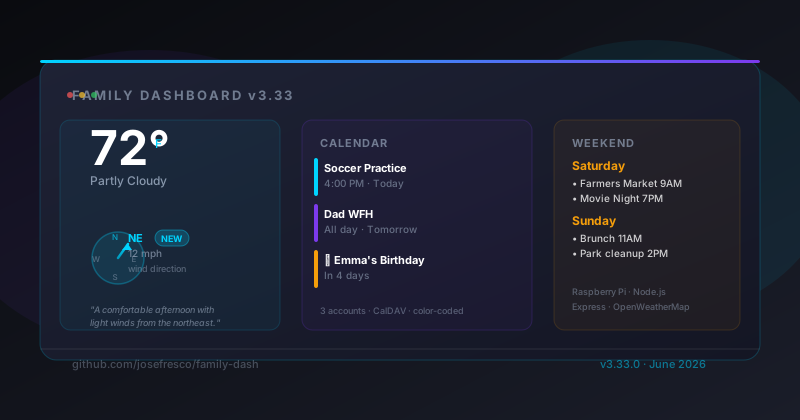
wind.deg field. Credentials never leave the server; the client sends only an account ID and the Express backend resolves passwords from .env.
What Family Dashboard Actually Is
Most wall displays are glorified digital photo frames running a slideshow. Family Dashboard is a different thing: a real-time information panel running on a Raspberry Pi, always on, always visible, mounted where the kitchen calendar used to be. The goal is a single glance that tells every family member what matters right now — weather, what's on the calendar today, what's coming up this weekend, and who has a birthday in the next thirty days.
The technical stack is deliberately boring: Node.js and Express on the server, vanilla JavaScript in the browser, OpenWeatherMap for weather, and CalDAV for calendar data. There's no React, no build step, no database. The server fetches data from external APIs, hands it to the client as JSON, and the client renders it directly. Simple enough to debug at 6 AM when the display goes blank.
It's been running on our kitchen wall since v3.30 and has accumulated a version history of genuinely useful features — extreme weather alerts, service workers for offline resilience (covered in the v3.32 post), birthday detection, a systemd unit for auto-start on boot. Version 3.33.0 adds the wind direction compass, which turned out to be a more interesting engineering problem than it sounds.
The v3.33.0 Feature: Wind Direction as a Compass
The previous weather panel showed temperature, conditions, humidity, and wind speed as a plain number. Wind at 12 mph tells you something. Wind at 12 mph from the northeast tells you considerably more — especially if you're deciding whether to open windows, take a bike ride, or put chairs away before rain arrives.
OpenWeatherMap's API already returns this data. The wind object in the current weather response includes both speed and deg — the wind direction in meteorological degrees, where 0° and 360° are north, 90° is east, 180° is south, 270° is west.
{
  "wind": {
    "speed": 5.14,
    "deg": 45,
    "gust": 8.23
  }
}
The v3.33.0 update routes this field through the weather payload to the client and renders it as a large directional arrow with a cardinal label. The conversion from degrees to cardinal direction is a standard lookup with eight segments:
function degToCardinal(deg) {
  const dirs = ['N','NE','E','SE','S','SW','W','NW'];
  return dirs[Math.round(deg / 45) % 8];
}
The arrow itself is an SVG element rotated by the degree value, so it points in the actual wind direction. The visual is large enough to read from across a room — which matters when your display audience is standing at the kitchen counter rather than sitting at a desk.
The Weather Narrative Engine
Wind direction is the latest addition to a feature that's been running since v3.30: a weather narrative engine that generates a short prose description of current conditions instead of (or alongside) raw numbers.
The engine lives in weather-narrative-engine.js on the server. It takes the full current weather object from OpenWeatherMap and returns one or two sentences describing what the weather actually feels like — the kind of summary a radio announcer might give rather than a data dashboard readout.
The logic works by matching conditions to a set of templates with variable interpolation. Temperature, wind speed, cloud cover, humidity, and precipitation probability each contribute to the output. A few representative cases:
- Low wind + comfortable temperature + clear sky → "A beautiful day with light winds and plenty of sunshine."
- High humidity + moderate temperature → "It'll feel muggier than the thermometer suggests — humidity is running high."
- Wind speed above a threshold → the engine appends the cardinal direction: "Steady winds from the northeast at 14 mph."
- Precipitation probability above 60% → "Rain looks likely later — probably worth grabbing an umbrella."
There's no machine learning here. It's a deterministic template system, which is exactly the right approach for a wall display. A language model could generate more varied output, but it would also introduce latency, API costs, and occasional hallucinations about the weather. A template engine is fast, free, and always factually grounded in the data it was given.
The v3.33.0 update extends the narrative to include wind direction when wind speed crosses a display threshold, so the narrative and the compass arrow tell the same story from different angles.
Multi-Account CalDAV: Three Calendars, One Display
Most families don't run a single shared calendar. Ours has three: a shared family calendar in Google, a personal calendar for each adult, and a kids' activities calendar. Family Dashboard supports up to three simultaneous CalDAV connections, each with its own color code, so events from different accounts are visually distinct on the display.
The CalDAV integration is handled by caldav-client.js, a server-side module that connects to CalDAV endpoints, parses event data from the iCalendar format, and normalizes it into a consistent structure the client can render. Google Calendar exposes CalDAV via a per-account URL; any compatible provider (iCloud, Fastmail, a self-hosted Nextcloud instance) works with the same client.
The configuration is purely environment-variable based. Three accounts map to three blocks in .env:
# Account 1 — shared family calendar
CAL_URL_1=https://www.google.com/calendar/dav/family@gmail.com/events
CAL_USERNAME_1=family@gmail.com
CAL_PASSWORD_1=app-password-here

# Account 2 — personal
CAL_URL_2=https://www.google.com/calendar/dav/jose@gmail.com/events
CAL_USERNAME_2=jose@gmail.com
CAL_PASSWORD_2=app-password-here

# Account 3 — kids
CAL_URL_3=https://www.google.com/calendar/dav/kids@gmail.com/events
CAL_USERNAME_3=kids@gmail.com
CAL_PASSWORD_3=app-password-here
The server loads these at startup and exposes a /api/calendar route that accepts an account index. The browser never handles usernames or passwords — it sends { accountId: 1 } and receives back a list of normalized events. This pattern is worth naming: credential indirection. The credentials live on the server, the client references them by index, and no sensitive values ever appear in browser DevTools, network logs, or client-side code.
The 30-Day Lookahead: Birthdays and Holidays
One of the dashboard's most-used features is the birthday and holiday lookahead: a rolling 30-day window that surfaces upcoming birthdays from the calendar and a built-in holiday list. If someone's birthday or a holiday falls in the next 30 days, it appears in the main view with a countdown.
Birthdays are detected from calendar events whose titles match a pattern (configurable, defaults to entries containing "birthday"). The holiday list is a static data structure in the server-side code, keyed by month and day, so no external API call is needed for known fixed-date holidays.
This feature was added in v3.30 and has been one of the most practically useful additions — the display doubles as a family reminder system that nobody has to actively check. The dashboard does the checking; you just have to walk past it.
Time-Based View Switching
The dashboard automatically changes what it shows based on the time of day. Before 5 PM Eastern, it displays today's events. After 5 PM, it switches to showing tomorrow's events, because by evening the relevant question has changed from "what's happening today" to "what do I need to know for tomorrow morning."
This is handled entirely in server-side logic. The /api/calendar route checks the current time and returns the appropriate day's events without requiring any client-side configuration. The client just renders whatever the server returns.
It's a small feature that solves a real annoyance: a wall display still showing today's 9 AM meeting at 9 PM is useless at best, mildly anxiety-inducing at worst. The auto-switch makes the display useful throughout the whole day without any interaction.
Running on a Raspberry Pi
The dashboard is designed to run on a Raspberry Pi — specifically the kind of always-on Pi that sits behind a wall-mounted display and does nothing else. The server process runs under either PM2 or a systemd unit (covered in detail in the v3.32 post), nginx handles HTTPS termination and reverse-proxies to the Express server on port 3000, and the iPad browser that's mounted on the wall hits the nginx endpoint.
The "optimized for older iPads" note in the README description is deliberate. We use a first-generation iPad Air as the wall display — it's long past its useful life as a handheld device but perfectly capable of running a browser in kiosk mode, and mounting it on the wall gave it a second useful life. The dashboard's CSS is specifically tested on that device's viewport dimensions and rendering engine.
Setup from a fresh clone looks like this:
# Install dependencies
npm install

# Copy the environment template
cp .env.example .env

# Fill in your OpenWeatherMap key, CalDAV credentials, city/coords
nano .env

# Start in development
node server.js

# Start with PM2 (production)
pm2 start server.js --name family-dash
pm2 save
pm2 startup
The .env.example file documents every variable with comments. There's no browser-based setup wizard — the configuration surface is a single file, which makes it easy to version, back up, and restore.
The PWA Layer
Family Dashboard is a Progressive Web App. The service worker (added in v3.32) pre-caches the app shell and applies a stale-while-revalidate strategy to the weather and calendar API routes. This means the display keeps showing the last known data through Pi reboots, network blips, and brief server restarts — exactly the failure modes that come up on a wall-mounted device that nobody is actively watching.
When data is served from cache rather than the live server, the display shows a staleness indicator — a subtle timestamp showing when the data was last updated — so family members know whether the weather reading is current or a few hours old. It's honest design: the dashboard tells you what it knows and when it learned it.
What v3.33.0 Ships
To summarize the v3.33.0 changes specifically:
- Wind direction compass: A large SVG arrow with cardinal label (N, NE, E, etc.) displayed alongside the current temperature and wind speed. Sourced from
wind.degin the OpenWeatherMap response. - Narrative update: The weather narrative engine now incorporates wind direction into its prose output when wind speed exceeds the display threshold.
- Weather payload extension: The
/api/weatherroute now includeswindDegandwindCardinalin its response alongside the existing fields.
It's a small release by line count but a meaningful one for daily use. Wind direction is exactly the kind of contextual detail that makes a weather display useful rather than decorative.
Get It Running
The full project is at github.com/josefresco/family-dash. The README covers setup from scratch — OpenWeatherMap key, Google App Passwords for CalDAV, the .env configuration, and deployment with PM2 or systemd. You need Node.js v18+ and about an afternoon to go from clone to wall.
If you're running a previous version, the v3.33.0 upgrade is a git pull and an npm install — no database migrations, no configuration changes required. The new windDeg and windCardinal fields are added to the weather payload automatically; the client-side rendering picks them up on the next weather refresh.