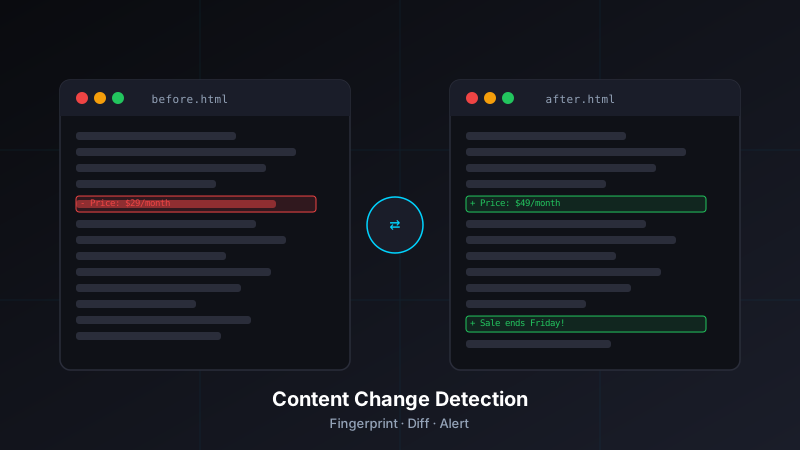
The Gap Uptime Monitoring Leaves Open
A 200 OK is a low bar. It means a server responded — it says nothing about what it responded with. Your site can return a 200 all day while its checkout page shows an error message, its pricing table has reverted to last year's rates, or a critical product description has gone blank.
This is the gap I wrote about when JF Website Monitor was first in development. Uptime is necessary but not sufficient. Content change detection is what fills the gap.
The challenge is that "content change" is a fuzzy concept. Almost every page on the web changes constantly — ad slots rotate, timestamps update, session tokens refresh, A/B test variants flip. A naive change detector would alert on every page load. The useful signal is specific, targeted changes: a price that moved, a product that appeared or disappeared, a status indicator that flipped.
Step 1: Fetching the Page
JF Website Monitor uses Puppeteer (headless Chromium) rather than a simple HTTP fetch for content checks. This was a deliberate choice: many modern pages require JavaScript execution to render their actual content. A fetch() of a React or Vue app returns an empty shell; the content lives in bundles that execute after load.
const browser = await puppeteer.launch({ headless: 'new' });
const page = await browser.newPage();

// Block unnecessary resources to speed up content checks
await page.setRequestInterception(true);
page.on('request', (req) => {
  const blocked = ['image', 'stylesheet', 'font', 'media'];
  if (blocked.includes(req.resourceType())) {
    req.abort();
  } else {
    req.continue();
  }
});

await page.goto(url, {
  waitUntil: 'networkidle2',
  timeout: 30000
});

const html = await page.content();
Blocking images, stylesheets, fonts, and media cuts check time significantly while preserving the DOM content we actually care about. networkidle2 waits until there are no more than 2 pending network connections for 500ms — reliable enough for SPA content rendering without waiting for every third-party tracker to finish.
Step 2: Targeting with CSS Selectors
Running a change check against an entire page's HTML would produce constant false positives. Instead, each monitor is configured with an optional CSS selector that scopes the check to a specific element:
// Example monitor configurations
const monitors = [
  {
    url: 'https://example.com/pricing',
    selector: '.pricing-table',    // Watch only the pricing section
    name: 'Pricing Page'
  },
  {
    url: 'https://shop.example.com/product/42',
    selector: '#stock-status',     // Watch only the stock indicator
    name: 'Product Stock Status'
  },
  {
    url: 'https://status.example.com',
    selector: null,                // No selector — watch the full page body
    name: 'Status Page'
  }
];
When a selector is provided, the engine extracts only that element's inner HTML before fingerprinting. When no selector is configured, it falls back to the full <body> content — useful for simple pages like status dashboards where any change is meaningful.
async function extractContent(page, selector) {
  if (!selector) {
    return page.$eval('body', el => el.innerHTML);
  }

  try {
    await page.waitForSelector(selector, { timeout: 5000 });
    return page.$eval(selector, el => el.innerHTML);
  } catch (err) {
    // Selector not found — record as a content error, not a change
    throw new ContentError(`Selector "${selector}" not found on page`);
  }
}
Missing selectors are treated as errors, not changes — this avoids false-positive alerts when a page restructures in a way that removes the monitored element entirely. A separate alert type surfaces "selector not found" so the monitor configuration can be updated.
Step 3: HTML Normalization
Raw HTML is full of noise that isn't meaningful content change. Before fingerprinting, the extracted HTML passes through a normalization pipeline that strips or collapses known sources of churn:
function normalizeHTML(html) {
  return html
    // Remove script tags and their content
    .replace(/<script\b[^>]*>[\s\S]*?<\/script>/gi, '')
    // Remove inline style attributes
    .replace(/\s+style="[^"]*"/gi, '')
    // Remove data attributes (often used for analytics/tracking IDs)
    .replace(/\s+data-[\w-]+="[^"]*"/gi, '')
    // Collapse whitespace
    .replace(/\s+/g, ' ')
    // Remove HTML comments
    .replace(/<!--[\s\S]*?-->/g, '')
    // Trim
    .trim();
}
This handles the most common noise sources: A/B test data attributes, tracking pixel scripts injected into the DOM, and whitespace-only formatting differences. The result is a stable representation of the visible text and structure, without the ephemeral metadata that changes on every render.
For sites with particularly volatile markup, monitors can be configured with an ignore patterns list — additional regex rules applied during normalization to strip site-specific noise before fingerprinting.
Step 4: SHA-256 Fingerprinting
The normalized HTML is hashed with SHA-256. The hash is small, fast to compare, and collision-resistant enough for this use case:
const crypto = require('crypto');

function fingerprint(normalizedHTML) {
  return crypto
    .createHash('sha256')
    .update(normalizedHTML, 'utf8')
    .digest('hex');
}
Each check run stores the fingerprint in the database alongside the check timestamp. On the next run, the new fingerprint is compared to the stored value:
async function runContentCheck(monitor) {
  const currentFingerprint = await fetchAndFingerprint(monitor);
  const stored = await db.getLastFingerprint(monitor.id);

  if (!stored) {
    // First check — establish baseline, no alert
    await db.saveFingerprint(monitor.id, currentFingerprint);
    return { changed: false, baseline: true };
  }

  const changed = currentFingerprint !== stored.fingerprint;

  if (changed) {
    await db.saveFingerprint(monitor.id, currentFingerprint);
    await db.recordChangeEvent(monitor.id, {
      previousFingerprint: stored.fingerprint,
      currentFingerprint,
      detectedAt: new Date()
    });
  }

  return { changed, previousFingerprint: stored.fingerprint };
}
Step 5: Diff Generation for Alerts
Knowing a change occurred is useful; knowing what changed is more useful. When a fingerprint mismatch is detected, the engine generates a human-readable diff to include in the alert notification.
The diff operates on the normalized text content (not raw HTML) — extracted with a simple text-only pass after normalization:
const { diffWords } = require('diff');

function generateTextDiff(previousHTML, currentHTML) {
  const previousText = extractText(normalizeHTML(previousHTML));
  const currentText = extractText(normalizeHTML(currentHTML));

  const changes = diffWords(previousText, currentText);

  const added = changes
    .filter(c => c.added)
    .map(c => c.value.trim())
    .filter(Boolean);

  const removed = changes
    .filter(c => c.removed)
    .map(c => c.value.trim())
    .filter(Boolean);

  return { added, removed };
}

function extractText(html) {
  // Strip remaining tags, decode entities
  return html
    .replace(/<[^>]+>/g, ' ')
    .replace(/&/g, '&')
    .replace(/</g, '<')
    .replace(/>/g, '>')
    .replace(/\s+/g, ' ')
    .trim();
}
The alert notification includes the top 3 added and removed text fragments — enough context to understand what changed without flooding a Telegram message with a full page dump.
Alert Thresholds and Cooldowns
Without thresholds, a page that legitimately changes every few minutes would generate a constant stream of alerts. Two mechanisms prevent this:
Change sensitivity threshold: Monitors can be configured with a minimum change percentage. The diff output is scored as a fraction of total word count — changes that affect less than the threshold (default: 5%) are recorded but don't trigger a notification. This handles rolling news tickers and "X minutes ago" timestamps that slip through normalization.
Alert cooldown: After a change alert fires, a configurable cooldown period (default: 1 hour) suppresses further alerts for that monitor. Changes during the cooldown are still recorded in the database — they just don't generate notifications until the cooldown expires. This prevents a single volatile element from producing dozens of consecutive alerts before you've had a chance to respond to the first one.
async function shouldAlert(monitor, changeEvent) {
  // Check change sensitivity
  const sensitivity = monitor.changeSensitivity ?? 0.05;
  if (changeEvent.changePercent < sensitivity) {
    return false;
  }

  // Check cooldown
  const lastAlert = await db.getLastAlertTime(monitor.id);
  if (lastAlert) {
    const cooldownMs = (monitor.alertCooldownMinutes ?? 60) * 60 * 1000;
    if (Date.now() - lastAlert.getTime() < cooldownMs) {
      return false;
    }
  }

  return true;
}
Notification Delivery
When a change passes the threshold and cooldown checks, a notification is dispatched. JF Website Monitor currently supports Telegram and email as delivery channels, configured per monitor.
The Telegram message format is designed to be scannable at a glance:
function formatTelegramAlert(monitor, diff) {
  const lines = [
    `🔄 *Content Change Detected*`,
    `📍 ${monitor.name}`,
    `🔗 ${monitor.url}`,
    ``
  ];

  if (diff.removed.length > 0) {
    lines.push(`*Removed:*`);
    diff.removed.slice(0, 3).forEach(text => {
      lines.push(`➖ ${text.substring(0, 100)}`);
    });
    lines.push('');
  }

  if (diff.added.length > 0) {
    lines.push(`*Added:*`);
    diff.added.slice(0, 3).forEach(text => {
      lines.push(`➕ ${text.substring(0, 100)}`);
    });
  }

  return lines.join('\n');
}
Performance: Running Checks at Scale
Content checks are significantly more expensive than uptime checks — each one spins up a headless browser, waits for JavaScript execution, and processes HTML. Running them at the same frequency as uptime checks (every minute) would be impractical for a self-hosted instance with modest hardware.
JF Website Monitor separates uptime check frequency from content check frequency. Typical configuration:
- Uptime checks: every 1–5 minutes (lightweight HTTP HEAD request)
- Content checks: every 15–60 minutes (full Puppeteer render)
Content checks also run with a concurrency limit — the Puppeteer pool is capped to prevent resource exhaustion on the host machine. On a Raspberry Pi 5 (the current self-hosted target), a pool of 2 concurrent browser instances keeps memory usage below 600MB while still completing a 20-monitor check cycle in under 8 minutes.
const pLimit = require('p-limit');
const limit = pLimit(2); // Max 2 concurrent Puppeteer instances

async function runAllContentChecks(monitors) {
  const tasks = monitors.map(monitor =>
    limit(() => runContentCheck(monitor))
  );
  return Promise.allSettled(tasks);
}
What's Still on the Roadmap
The content change detection engine covers the core use cases well, but there are a few areas still in development:
- Visual diff screenshots — Capturing before/after screenshots and highlighting changed regions visually. Useful for layout changes that don't surface in text diff.
- Structured data extraction — Rather than diffing HTML, extracting specific values (price, stock count, rating) and alerting when they cross configured thresholds. More precise than text diff for e-commerce monitoring.
- Change history UI — The database stores every fingerprint and change event, but the dashboard currently only shows the most recent. A timeline view of change events would make it easier to correlate content changes with traffic or conversion data.
The Broader Context
Content change detection is one piece of a monitoring stack that includes SLA compliance reporting, uptime tracking, and performance checks. It runs self-hosted — after migrating off Vercel — on the same Raspberry Pi that handles the Family Dashboard, Pi Backups, and the rest of the automation stack.
The code is in the jf-website-monitor GitHub repo. The live service is at jfwebsitemonitor.com — free to use, with self-hosting instructions in the repo README.