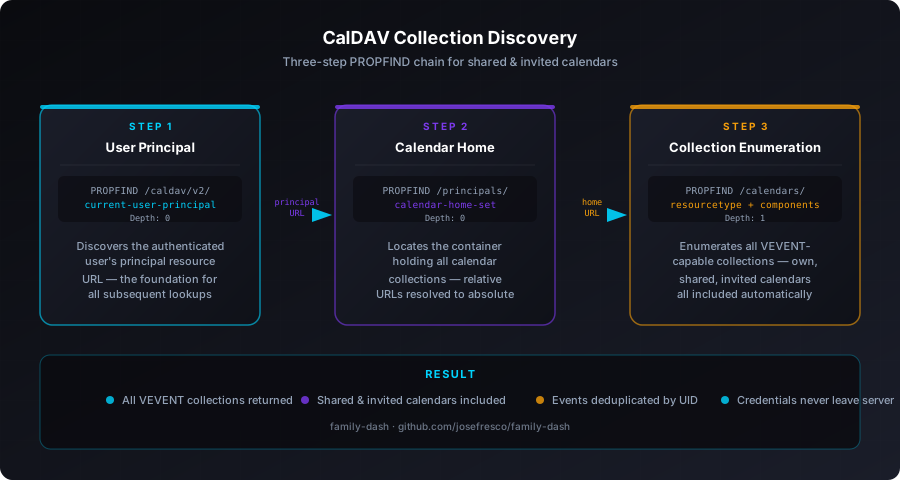
Depth: 1. This is what family-dash does server-side so shared and invited Google Calendar events appear on the wall display automatically, without any extra setup.
The Problem With a Single CalDAV URL
The simplest CalDAV integration looks like this: take a hardcoded endpoint URL, attach Basic Auth credentials, fire a REPORT request, parse the ICS response. For a personal calendar with no shares, this works fine. For a family dashboard showing multiple people's schedules — each account having their own calendar, shared family calendars, and events they've been invited to by others — it falls apart immediately.
The issue is structural. Google's CalDAV implementation stores each calendar as a separate collection under the user's calendar home. A shared family calendar that your partner owns and you're a member of lives under their calendar home URL, not yours. But a CalDAV server will still surface it to you — if you ask the right way. The wrong way is hitting /caldav/v2/user@gmail.com/events/ directly and hoping for the best. That returns only the primary calendar collection. Shared calendars, birthday calendars, subscribed calendars — they're all absent.
Family Dashboard v3.32 fixed this with a proper collection discovery implementation. The short description in the changelog reads "expanded CalDAV collection discovery to query all collections, including shared and invited calendars through a 3-step PROPFIND chain." This post digs into exactly what those three steps are and why each one is necessary.
Step 1: Discover the Current User Principal
The discovery chain starts with the only URL you're guaranteed to have: the initial CalDAV endpoint configured in .env. For Google that's https://apidata.googleusercontent.com/caldav/v2/; for iCloud it's https://caldav.icloud.com/.
The first PROPFIND request asks the server for the current-user-principal property. This is a WebDAV property defined in RFC 5397 that every CalDAV-compliant server is required to support. It returns the URL of the authenticated user's principal resource — essentially a pointer to "who you are" on this server.
PROPFIND /caldav/v2/ HTTP/1.1
Host: apidata.googleusercontent.com
Authorization: Basic dXNlcjpwYXNz
Depth: 0
Content-Type: application/xml

<?xml version="1.0" encoding="UTF-8"?>
<d:propfind xmlns:d="DAV:">
  <d:prop>
    <d:current-user-principal/>
  </d:prop>
</d:propfind>
The server responds with a 207 Multi-Status containing the principal URL — something like /caldav/v2/user%40gmail.com/user/. This value is extracted from the XML response and passed to step two. If this request fails or returns no principal, the implementation logs the error and returns an empty array, falling back to whatever events the primary URL provides.
Step 2: Find the Calendar Home Set
The principal URL from step one isn't a calendar — it's an identity resource. What you actually need is the calendar home set: the container that holds all of a user's calendar collections. That's defined in RFC 4791 as the calendar-home-set DAV property, and you retrieve it with a second PROPFIND request directed at the principal URL.
PROPFIND /caldav/v2/user%40gmail.com/user/ HTTP/1.1
Host: apidata.googleusercontent.com
Authorization: Basic dXNlcjpwYXNz
Depth: 0
Content-Type: application/xml

<?xml version="1.0" encoding="UTF-8"?>
<d:propfind xmlns:d="DAV:" xmlns:c="urn:ietf:params:xml:ns:caldav">
  <d:prop>
    <c:calendar-home-set/>
  </d:prop>
</d:propfind>
The response is another 207 containing an href element inside the calendar-home-set property — something like /caldav/v2/user%40gmail.com/. Importantly, this value can be either an absolute URL or a relative path. The implementation resolves relative paths to absolute URLs using the base URL of the initial endpoint before proceeding, which matters for iCloud and generic CalDAV providers whose home set paths are often relative.
Step 3: Enumerate All Calendar Collections
With the calendar home URL in hand, the third PROPFIND is the one that does the real work. It requests all resources directly beneath the calendar home with Depth: 1, asking for two specific properties on each: resourcetype (to confirm it's actually a calendar collection) and supported-calendar-component-set (to confirm it supports VEVENT components — as opposed to VTODO-only task calendars or VJOURNAL collections).
PROPFIND /caldav/v2/user%40gmail.com/ HTTP/1.1
Host: apidata.googleusercontent.com
Authorization: Basic dXNlcjpwYXNz
Depth: 1
Content-Type: application/xml

<?xml version="1.0" encoding="UTF-8"?>
<d:propfind xmlns:d="DAV:" xmlns:c="urn:ietf:params:xml:ns:caldav">
  <d:prop>
    <d:resourcetype/>
    <d:displayname/>
    <c:supported-calendar-component-set/>
  </d:prop>
</d:propfind>
The response lists every resource under the home set. For each one, the implementation checks two conditions before including it as a queryable calendar:
- The
resourcetypemust declare bothcollectionandcalendar— filtering out principal resources, inbox and outbox folders, and other WebDAV resources that live alongside calendars - The
supported-calendar-component-setmust include VEVENT — filtering out task lists and journal collections that don't contain events
Collections that pass both checks are returned as an array of objects containing the collection URL and display name. This is where shared and invited calendars appear. Because Google's CalDAV implementation surfaces all calendars visible to the authenticated user under the same home set — regardless of who owns them — a family calendar shared by another account shows up automatically in this enumeration step without any additional configuration.
Why the Three Steps Can't Be Collapsed
The obvious question is whether steps one and two could be skipped by just guessing the calendar home URL from the initial endpoint. The answer is: sometimes, but not reliably across providers.
Google's URL structure is predictable enough that you could guess /caldav/v2/user%40gmail.com/ as the calendar home. But iCloud's home set path is constructed differently, and generic CalDAV servers — Nextcloud, Radicale, Baikal — use wildly different URL structures. The PROPFIND chain is provider-agnostic. It works against any RFC 4791-compliant server because the protocol itself defines where to find each piece of information.
There's also a less obvious reason: URL encoding. A Gmail address like user+tag@gmail.com encodes differently depending on the server. Following the href values returned by the server itself, rather than constructing URLs from email addresses, avoids encoding mismatches that would silently return empty results instead of raising an error.
Credentials Never Leave the Server
All three PROPFIND requests run inside the Express route handler at /api/calendar, not in the browser. The client sends only an accountId — a sanitized index like acc_1 — and the server retrieves the corresponding username and password from environment variables:
// Simplified credential lookup in /api/calendar
const idx = accountId.replace(/^acc_/, '');
const username = process.env[`CALDAV_${idx}_USERNAME`];
const password = process.env[`CALDAV_${idx}_PASSWORD`];
const authHeader = 'Basic ' + Buffer.from(`${username}:${password}`).toString('base64');
The authHeader is passed through all three PROPFIND requests and the final REPORT that fetches event data. The browser never touches the credentials. This architecture — introduced in v3.31 when the dashboard moved from Vercel to a self-hosted Raspberry Pi — is what makes Google App Passwords a viable authentication strategy here. App Passwords are long-lived but narrowly scoped; losing one doesn't compromise the whole Google account. Keeping them in a server-side .env file means they never appear in network traffic observable from the iPad's browser.
Deduplication After Discovery
Running VEVENT REPORT queries against every discovered collection introduces a new problem: the same event can appear in multiple collections. An event on the family calendar that was created by one account and accepted by another will often appear in both the owner's primary calendar and the invitee's collection. Without deduplication the wall display would show duplicate entries for every shared event.
The implementation deduplicates by UID after all collection results are merged. Each VEVENT in an ICS file carries a globally unique identifier in the UID property. Collecting all parsed events into a Map keyed by UID and then converting back to an array drops duplicates while keeping whichever version of the event was encountered first — which is fine for display purposes since both copies have the same summary, start time, and end time.
What Gets Unlocked
Before the three-step PROPFIND chain, family-dash showed events only from whichever calendar collection was at the hardcoded primary URL — typically the account's default calendar. After the change, the wall display automatically includes:
- Shared family calendars — calendars owned by one account member and shared with others at any permission level
- Invited events — individual events from other calendars that the user has accepted, which Google surfaces as a separate collection
- Subscribed calendars — read-only calendars like national holidays or school schedules that are visible under the user's home set
- Birthday calendars — Google's auto-generated birthday collection appears as a VEVENT calendar in the enumeration and is now included in the 30-day lookahead
None of this requires any additional configuration in .env. As long as an account's credentials are set up correctly, every calendar that account can see in Google Calendar will appear on the dashboard automatically.
Fallback Behavior
Each of the three discovery steps is wrapped in its own try-catch. If the first PROPFIND fails — bad credentials, network timeout, a server that doesn't return a current-user-principal — the function logs the error and returns an empty array. The caller then falls back to querying just the primary URL configured for that account, which is the behavior from before v3.32.
If step one succeeds but step two or three fails, the same graceful degradation applies. This makes the discovery opt-in at a per-account level: if a generic CalDAV server doesn't support RFC 5397, the dashboard still works — it just won't discover additional collections for that account.
Practical Setup
From a configuration perspective nothing changes. The .env setup remains the same as described in the initial CalDAV setup post: provider, username, and App Password per account. The discovery chain runs automatically on every calendar fetch. There's no flag to enable it and no discovery cache to invalidate when calendars are added or removed — the three PROPFIND requests run fresh on each fetch cycle, so a newly shared calendar shows up on the next refresh without a server restart.