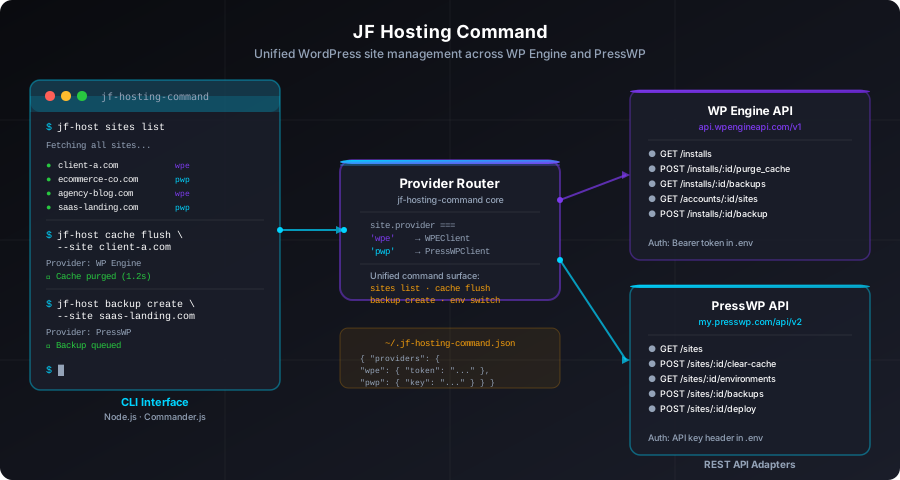
jf-host sites list pulls installs from both platforms and prints them in one table. jf-host cache flush --site example.com detects which provider hosts that site and fires the correct API call. A JSON config file in your home directory stores both sets of credentials; a provider router dispatches every command to the right API client at runtime.
The Problem With Managing Multiple WordPress Hosts
The WordPress hosting market has fragmented significantly over the last few years. Managed WordPress hosting is good — it takes server maintenance off your plate, provides staging environments, and gives you a CDN-backed cache layer out of the box. But when you manage sites for multiple clients, or when a single client's portfolio spans more than one hosting provider, the fragmentation becomes a daily friction point.
WP Engine has a web dashboard, an API, and its own CLI. PressWP has a web dashboard and an API. Each has its own authentication model, its own API shape, its own vocabulary for the same concepts (WP Engine calls them "installs," PressWP calls them "sites"), and its own rate limits. Context-switching between two browser tabs to flush a cache or check a backup is a small but persistent annoyance that compounds across a week of WordPress work.
The obvious answer is a single command-line tool that knows about both. jf-hosting-command is that tool.
What Came Before: wpe-central-command
Earlier this year I wrote about wpe-central-command — a web-based fleet dashboard for WP Engine sites — and the companion PHP plugin that fills the gaps in WP Engine's API with site-level data. That project solved the multi-site visibility problem for WP Engine specifically: one browser tab, all your WP Engine installs, health status at a glance.
But wpe-central-command is a dashboard, not a command tool. You open it in a browser and click buttons. It doesn't help when you're already in a terminal working on a deploy and you need to flush a cache. And it's WP Engine only — when a client's site sits on PressWP, you're back to a second browser tab.
jf-hosting-command started as a companion to wpe-central-command and ended up as its own project with a broader scope.
Architecture: A Provider Router in Front of Two API Clients
The core design decision is straightforward: every user-facing command routes through a dispatcher that reads the site's provider from the config file and delegates to the appropriate API client. The two clients — WPEClient for WP Engine and PressWPClient for PressWP — implement the same interface but talk to different APIs.
This means the CLI surface is provider-agnostic. You don't run jf-host wpe cache flush or jf-host pwp cache flush. You run jf-host cache flush --site example.com and the router handles the rest. The site-to-provider mapping lives in your local config file.
The config file at ~/.jf-hosting-command.json holds two things: provider credentials and a site registry that maps domain names to their hosting provider:
{
  "providers": {
    "wpe": {
      "token": "your-wpe-bearer-token"
    },
    "pwp": {
      "key": "your-presswp-api-key"
    }
  },
  "sites": {
    "client-a.com": { "provider": "wpe", "install": "clientainstall" },
    "ecommerce-co.com": { "provider": "pwp", "siteId": "site_abc123" },
    "agency-blog.com": { "provider": "wpe", "install": "agencyblog" },
    "saas-landing.com": { "provider": "pwp", "siteId": "site_xyz789" }
  }
}
The install key for WP Engine sites is the install name used in API paths. The siteId for PressWP is the site's platform identifier. Both are populated automatically when you run jf-host sites sync, which fetches all installs from both providers and writes the site registry.
The CLI Layer: Commander.js with Subcommands
The CLI is built with Commander.js, which makes it straightforward to define nested subcommands and share option definitions across them. The top-level command is jf-host. Subcommands organize the action space:
jf-host sites list              # list all sites from both providers
jf-host sites sync              # re-fetch site registry from APIs
jf-host cache flush             # flush cache for a site
jf-host backup create           # trigger a backup
jf-host backup list             # list recent backups
jf-host env list                # list environments (prod/staging/dev)
jf-host env switch              # switch active environment
jf-host status                  # check provider API connectivity
Each subcommand accepts a --site <domain> option for site-specific operations. The --provider <wpe|pwp> flag lets you scope a command to one provider when you don't need both (for example, jf-host sites list --provider wpe to see only WP Engine installs).
WPEClient: Wrapping the WP Engine v1 API
The WP Engine API (api.wpengineapi.com/v1) uses HTTP Basic authentication with an API username and password pair encoded as a Bearer token. WPEClient wraps the endpoints the tool needs behind async methods:
class WPEClient {
  constructor(token) {
    this.baseUrl = 'https://api.wpengineapi.com/v1';
    this.headers = {
      'Authorization': `Basic ${token}`,
      'Content-Type': 'application/json'
    };
  }

  async listInstalls() {
    return this._get('/installs?limit=100');
  }

  async purgeCache(installName) {
    return this._post(`/installs/${installName}/purge_cache`);
  }

  async listBackups(installName) {
    return this._get(`/installs/${installName}/backups`);
  }

  async createBackup(installName, description) {
    return this._post(`/installs/${installName}/backups`, {
      description: description || 'jf-hosting-command backup'
    });
  }

  async listEnvironments(installName) {
    return this._get(`/installs?site=${installName}`);
  }

  async _get(path) { /* shared fetch wrapper */ }
  async _post(path, body) { /* shared fetch wrapper */ }
}
One quirk of the WP Engine API is that "environments" (production, staging, development) are separate installs in the same account, linked by a shared site name. jf-host env list --site client-a.com fetches all installs and filters to the ones whose site name matches, returning the three environment variants with their status and PHP version.
PressWPClient: A Different API Shape
PressWP's API uses an API key sent as an X-API-Key header rather than Basic auth. The endpoint paths and resource vocabulary are also different — where WP Engine uses "installs," PressWP uses "sites," and what WP Engine calls "purge_cache" PressWP calls "clear-cache." PressWPClient maps the same interface to PressWP's conventions:
class PressWPClient {
  constructor(apiKey) {
    this.baseUrl = 'https://my.presswp.com/api/v2';
    this.headers = {
      'X-API-Key': apiKey,
      'Content-Type': 'application/json'
    };
  }

  async listInstalls() {
    const { sites } = await this._get('/sites');
    // Normalize to same shape as WPEClient.listInstalls()
    return sites.map(s => ({
      id: s.id,
      name: s.domain,
      status: s.status,
      php_version: s.phpVersion,
      provider: 'pwp'
    }));
  }

  async purgeCache(siteId) {
    return this._post(`/sites/${siteId}/clear-cache`);
  }

  async listBackups(siteId) {
    return this._get(`/sites/${siteId}/backups`);
  }

  async createBackup(siteId, description) {
    return this._post(`/sites/${siteId}/backups`, { label: description });
  }

  async listEnvironments(siteId) {
    return this._get(`/sites/${siteId}/environments`);
  }
}
The normalization in listInstalls() is important: both clients return objects that share the same shape, which means the sites list command can merge and display them in a single table without knowing which provider produced each row.
The Provider Router
The dispatcher reads the site entry from the config and instantiates the right client on demand. It's not complex — it's a switch on the provider string — but keeping it explicit means the routing logic is in one place rather than scattered through every command handler:
function getClientForSite(domain, config) {
  const entry = config.sites[domain];
  if (!entry) {
    throw new Error(`Unknown site: ${domain}. Run "jf-host sites sync" to register it.`);
  }

  if (entry.provider === 'wpe') {
    return {
      client: new WPEClient(config.providers.wpe.token),
      siteRef: entry.install,
      provider: 'wpe'
    };
  }

  if (entry.provider === 'pwp') {
    return {
      client: new PressWPClient(config.providers.pwp.key),
      siteRef: entry.siteId,
      provider: 'pwp'
    };
  }

  throw new Error(`Unknown provider: ${entry.provider}`);
}
Each command handler calls getClientForSite(), destructures the client and siteRef, and calls the relevant method. The handler doesn't care which provider it's talking to — it just calls client.purgeCache(siteRef) and formats the response.
sites list: Merging Two Providers Into One Table
The sites list command is the one I use most. It fires requests to both providers in parallel using Promise.all, merges the results, and prints a table sorted alphabetically by domain:
async function listSites(options, config) {
  const fetchers = [];

  if (!options.provider || options.provider === 'wpe') {
    const wpe = new WPEClient(config.providers.wpe.token);
    fetchers.push(wpe.listInstalls());
  }

  if (!options.provider || options.provider === 'pwp') {
    const pwp = new PressWPClient(config.providers.pwp.key);
    fetchers.push(pwp.listInstalls());
  }

  const results = await Promise.all(fetchers);
  const sites = results.flat().sort((a, b) => a.name.localeCompare(b.name));

  // Print table
  console.log(formatTable(sites, ['name', 'status', 'php_version', 'provider']));
}
The output looks like this in a terminal that supports color:
SITE                  STATUS   PHP    PROVIDER
─────────────────────────────────────────────
agency-blog.com       active   8.2    wpe
client-a.com          active   8.1    wpe
client-b.com          active   8.2    wpe
ecommerce-co.com      active   8.3    pwp
saas-landing.com      active   8.2    pwp
staging-test.com      active   8.0    pwp
The provider column uses color — purple for WP Engine, cyan for PressWP — so at a glance you can see the mix without parsing the text.
Cache Flushing Across Providers
Cache flushes are where the unified interface pays off most clearly. On WP Engine, purging the cache is a POST /installs/:name/purge_cache request that returns immediately — the purge is asynchronous on WP Engine's side, but the API call acknowledges instantly. On PressWP, it's POST /sites/:id/clear-cache and similarly fast.
From the command line, both look identical:
# WP Engine site
$ jf-host cache flush --site client-a.com
Provider: WP Engine (install: clientainstall)
✓ Cache purged (1.2s)

# PressWP site
$ jf-host cache flush --site saas-landing.com
Provider: PressWP (site: site_xyz789)
✓ Cache purged (0.9s)
You can also flush all sites on one provider at once:
$ jf-host cache flush --provider wpe
Flushing cache for 4 WP Engine sites...
✓ agency-blog.com (1.1s)
✓ client-a.com (0.8s)
✓ client-b.com (1.3s)
✓ client-c.com (0.9s)
The bulk flush uses Promise.all across the site list so all four requests fire in parallel rather than sequentially.
Backups
Both hosting providers support on-demand backups through their APIs, though the behavior differs. WP Engine backups are labeled checkpoints that appear in the WP Engine dashboard alongside scheduled backups. PressWP backups behave the same way. The backup create command triggers whichever the site's provider supports:
$ jf-host backup create --site ecommerce-co.com
Provider: PressWP (site: site_abc123)
✓ Backup queued — label: "jf-hosting-command 2026-08-25"

$ jf-host backup list --site ecommerce-co.com
ID              DATE                  SIZE    STATUS
──────────────────────────────────────────────────
bkp_0041        2026-08-25 09:14      2.3 GB  complete
bkp_0040        2026-08-24 09:10      2.2 GB  complete
bkp_0039        2026-08-23 09:09      2.2 GB  complete
Setup and Configuration
Installation is a global npm install from the repo:
git clone https://github.com/josefresco/jf-hosting-command.git
cd jf-hosting-command
npm install
npm link
After that, jf-host is available globally. The first-run setup is a guided jf-host init command that prompts for both sets of API credentials and writes ~/.jf-hosting-command.json. Once credentials are stored, jf-host sites sync populates the site registry by calling both provider APIs:
$ jf-host sites sync
Fetching WP Engine installs...  ✓ 4 installs
Fetching PressWP sites...       ✓ 3 sites
Registry updated: 7 sites total
Config written to ~/.jf-hosting-command.json
From that point the site-to-provider mapping is local and offline — you're not hitting an API every time you run a command that specifies a site name. Only the commands that actually operate on a site make API calls.
Error Handling and API Failures
Both API clients include retry logic for transient network errors and surface provider-specific error messages rather than generic HTTP failures. A 401 from either provider prints an actionable message pointing at the credential that needs refreshing:
$ jf-host sites list
Error: WP Engine authentication failed (401)
→ Check providers.wpe.token in ~/.jf-hosting-command.json
  Generate a new token at: my.wpengine.com/api_access
Rate limiting is handled with automatic backoff. WP Engine's v1 API enforces a request rate limit per account; if a bulk operation hits it, the client waits for the Retry-After header value before retrying. PressWP's API has similar behavior for its own limits.
What It Replaced
Before this tool, managing a mixed-provider WordPress portfolio meant:
- Opening my.wpengine.com, navigating to the right install, clicking "Flush Cache"
- Opening my.presswp.com, navigating to the right site, clicking "Clear Cache"
- Manually checking both dashboards to see backup status
- Switching between two API docs when writing any automation
Now it's jf-host cache flush --site example.com regardless of who hosts it, and jf-host sites list when I need to see the whole picture in one place.
The wpe-central-command dashboard is still useful for the at-a-glance view in a browser — it shows health indicators and plugin counts that the CLI doesn't display. But for operational tasks in a terminal context, jf-hosting-command is the daily driver.
What's Next
A few things I want to add when I have time:
- Deploy triggering: Both providers support some form of deployment or environment promotion (pushing staging to production). Exposing that as
jf-host env deploy --site example.com --from stagingwould be genuinely useful. - Plugin and theme audit: wpe-central-command-helper already pulls plugin data from WP Engine sites via a companion plugin. Piping that data through the CLI —
jf-host plugins outdated --provider wpe— would let me spot sites with stale plugins from the terminal without opening a browser. - Third provider support: The adapter pattern makes adding a new provider relatively low friction. If a client ends up on Kinsta or Flywheel, adding a
KinstaClientorFlywheelClientis a matter of implementing the same five methods and adding a provider key to the router.
The full source is on GitHub: josefresco/jf-hosting-command.