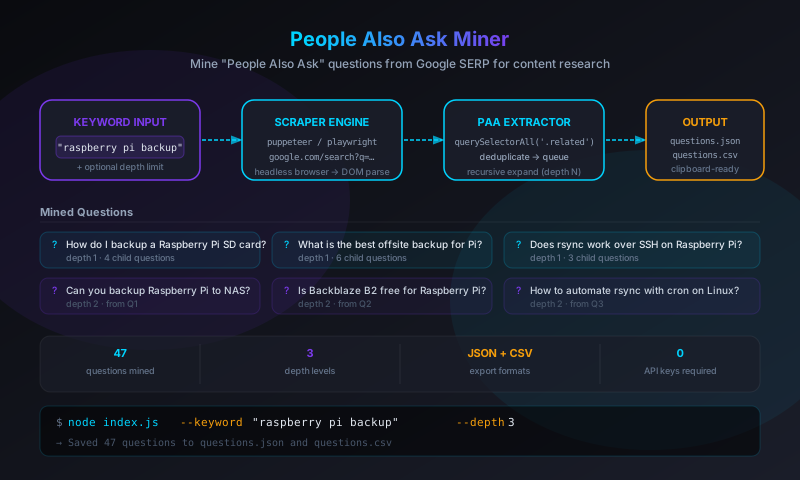
questions.json and questions.csv. No API key required, no per-query cost, no 3rd-party service. One command yields dozens of real user questions you can use directly for blog post ideation, FAQ sections, or structured data markup.
The Problem with Keyword Tools
Most content research tools are either expensive (Ahrefs, SEMrush), rate-limited (Google Keyword Planner), or noisy (autocomplete scrapers that return every prefix variation rather than the natural-language questions real users type). The "People Also Ask" box is different — it surfaces questions Google has already validated as genuinely related to a topic, phrased the way users actually phrase them.
What makes it particularly useful is its recursive nature. Click any question in the PAA box and Google expands it, revealing a new set of related questions. That expansion can go several levels deep, turning a single seed keyword into a rich topic map with dozens of entry points for content.
I wanted to automate that expansion — run it programmatically, collect all the questions, and output them in a format I could drop into a spreadsheet or use as input for AI-assisted content outlines.
How the PAA Box Works
Google's "People Also Ask" feature appears as a collapsible box in most informational search results. Each entry is a question; clicking it expands an accordion that shows a brief answer excerpt and a link to the source. When you expand a question, Google typically appends 2–4 new questions to the bottom of the PAA list — questions that are semantically related to the one you just clicked, not just the original query.
This means:
- A search for "raspberry pi backup" might show 4 initial questions
- Expanding question 1 adds 3 more → 7 total
- Expanding each of those adds 2–4 more → 13–19 total
- By depth 3, you can have 40–60 unique questions from a single seed
The challenge: this expansion is triggered by JavaScript click events and DOM mutations, not by loading new URLs. You can't scrape it with a simple HTTP fetch — you need a browser.
The Tool: people-also-ask
The tool is a Node.js CLI built around a headless browser. The core loop is:
- Load a Google search results page for the seed keyword
- Find and collect all visible PAA questions
- For each question not yet seen, click to expand it (triggering Google to append new questions)
- Collect the newly revealed questions
- Repeat until the desired depth is reached or no new questions appear
- Write output to
questions.jsonandquestions.csv
Project Structure
people-also-ask/
├── index.js          # CLI entry point and argument parsing
├── scraper.js        # Browser automation and PAA extraction logic
├── exporter.js       # JSON and CSV export
├── utils.js          # Deduplication and question normalization
└── package.json      # puppeteer dependency
The Scraper
The scraper uses Puppeteer to control a headless Chromium instance. The key challenge is that Google's PAA box isn't a stable, named DOM element — its structure changes periodically and its selectors aren't documented. The scraper uses a selector strategy that targets the question text pattern rather than a specific class name:
// scraper.js (simplified)
const puppeteer = require('puppeteer');

async function scrape(keyword, maxDepth = 2) {
    const browser = await puppeteer.launch({ headless: 'new' });
    const page    = await browser.newPage();

    // Mimic a real browser — avoids most bot detection
    await page.setUserAgent(
        'Mozilla/5.0 (Macintosh; Intel Mac OS X 10_15_7) ' +
        'AppleWebKit/537.36 (KHTML, like Gecko) ' +
        'Chrome/124.0.0.0 Safari/537.36'
    );

    const searchUrl = `https://www.google.com/search?q=${encodeURIComponent(keyword)}&hl=en`;
    await page.goto(searchUrl, { waitUntil: 'networkidle2' });

    const seen      = new Set();
    const questions = [];

    async function expandPAA(depth) {
        if (depth > maxDepth) return;

        // Find all PAA question elements currently visible in the DOM
        const paaQuestions = await page.$$eval(
            '[jsname="Cpkphb"] [role="heading"]',
            els => els.map(el => el.textContent.trim())
        );

        const newQuestions = paaQuestions.filter(q => !seen.has(q));
        newQuestions.forEach(q => {
            seen.add(q);
            questions.push({ text: q, depth });
        });

        // Click each new question to trigger expansion
        for (const q of newQuestions) {
            try {
                await page.evaluate((text) => {
                    const headings = document.querySelectorAll('[jsname="Cpkphb"] [role="heading"]');
                    for (const h of headings) {
                        if (h.textContent.trim() === text) {
                            h.closest('[jsname="Cpkphb"]').click();
                            return;
                        }
                    }
                }, q);

                // Allow Google's JS to append new questions
                await page.waitForTimeout(800);
            } catch (e) {
                // Element may have scrolled away — continue with others
            }
        }

        // Recurse to collect any newly visible questions
        await expandPAA(depth + 1);
    }

    await expandPAA(0);
    await browser.close();
    return questions;
}
Why waitForTimeout Instead of waitForSelector
The ideal approach would be to wait for a new PAA question element to appear in the DOM before continuing. The problem is that Google's PAA expansion doesn't reliably produce a new element with a distinct selector — sometimes it expands an existing container, sometimes it appends to a list that already has elements of the same class. A fixed 800ms delay is less elegant but more reliable across Google's A/B tested DOM variations. Longer delays (1200ms+) further reduce the chance of missing a slow expansion but proportionally increase total run time.
Deduplication
PAA questions can appear multiple times — the same question might surface at depth 1 as a direct related question and again at depth 2 expanded from a different parent. The seen Set handles exact-match deduplication. A normalization step strips trailing punctuation and lowercases for near-duplicate detection:
// utils.js
function normalize(question) {
    return question
        .toLowerCase()
        .replace(/[?.!]+$/, '')
        .trim();
}

function deduplicate(questions) {
    const normalizedSeen = new Set();
    return questions.filter(q => {
        const key = normalize(q.text);
        if (normalizedSeen.has(key)) return false;
        normalizedSeen.add(key);
        return true;
    });
}
This catches cases where "How do I backup my Raspberry Pi?" and "How do I backup my Raspberry Pi" (without the question mark) would otherwise appear as two separate entries.
Output Formats
The tool writes two files on every run:
questions.json
The full question tree with metadata — useful when you want to process questions programmatically or pass them to an LLM for outline generation:
[
  {
    "text": "How do I backup a Raspberry Pi SD card?",
    "depth": 0,
    "keyword": "raspberry pi backup"
  },
  {
    "text": "Can you backup Raspberry Pi to NAS?",
    "depth": 1,
    "keyword": "raspberry pi backup"
  },
  {
    "text": "Is Backblaze B2 free for Raspberry Pi?",
    "depth": 2,
    "keyword": "raspberry pi backup"
  }
]
questions.csv
The flat list of questions — useful for dropping into a spreadsheet, sorting by depth, or pasting into a content brief:
depth,question
0,"How do I backup a Raspberry Pi SD card?"
0,"What is the best offsite backup for Pi?"
0,"Does rsync work over SSH on Raspberry Pi?"
1,"Can you backup Raspberry Pi to NAS?"
1,"Is Backblaze B2 free for Raspberry Pi?"
2,"How to automate rsync with cron on Linux?"
Usage
# Clone and install
git clone https://github.com/josefresco/people-also-ask.git
cd people-also-ask
npm install

# Basic usage — depth 2, writes questions.json and questions.csv
node index.js --keyword "raspberry pi backup"

# Deeper crawl — more questions, proportionally longer runtime
node index.js --keyword "wordpress performance" --depth 3

# Different output directory
node index.js --keyword "home automation" --output ./research/
A depth-2 crawl on most keywords takes 30–90 seconds. A depth-3 crawl can take 2–4 minutes depending on how many unique questions are found at each level. There's no built-in rate limiting because the browser session mimics a human browsing session, but running multiple concurrent scrapes from the same IP is not recommended.
Where I Use This
The immediate use case that prompted the tool was planning blog content for my projects. When writing a post about pi-backups, I wanted to know what questions readers might arrive with — not keyword variations, but the actual questions they'd type into Google. Running the tool on "raspberry pi backup" produced 43 unique questions in under a minute, which I filtered down to a target set and used to structure the post's headings.
Other uses that have come up since:
- FAQ sections: PAA questions are already validated as FAQ material — Google explicitly surfaces them as questions users want answered. Running the tool before building a product page FAQ produces a ready-made list with zero guesswork.
- Structured data: The questions map directly to
FAQPageschema markup. The JSON output can be piped into a template that generates the schema block. - LLM prompt input: Feeding the CSV to an LLM with a prompt like "generate a blog post outline that addresses all of these questions" produces surprisingly coherent outlines, because the questions define the topic scope better than a keyword alone.
- Competitor gap analysis: Running the tool on keywords a competitor ranks for shows you what their audience is actually asking — independent of what they've chosen to write about.
Limitations and Edge Cases
Google Changes Its DOM
The most significant limitation of any Google scraper is that Google updates its frontend regularly. The selector [jsname="Cpkphb"] [role="heading"] is stable as of May 2026, but there's no guarantee it will remain so. When Google changes the PAA structure, the scraper needs updating. I've had to update the selector twice in the past year — once when Google restructured the accordion markup, once when they added a new question format that used a different ARIA role.
The fix each time was straightforward: inspect the PAA box in browser devtools, find the new selector, update the two places in scraper.js that reference it. But it does mean the tool requires periodic maintenance.
Rate Limits and CAPTCHAs
Google doesn't expose a rate limit for anonymous search queries, but running too many searches in a short window from the same IP will trigger CAPTCHA challenges. The tool runs one search per invocation — it doesn't batch multiple keywords in a single session — which keeps it well inside safe territory for personal use. If you want to process a list of 50 keywords, run them sequentially with a few minutes between each, not in a tight loop.
Locale Dependency
PAA results are locale-sensitive. The same keyword returns different questions in English (US) vs. English (UK) vs. Spanish. The tool passes &hl=en in the query string to request English results, but the actual country serving the response depends on the scraping machine's IP geolocation. Results may vary if you're running this from outside the US.
Questions Without PAA Boxes
Some keywords — primarily navigational queries like brand names or exact URLs — don't trigger a PAA box at all. The tool handles this gracefully: if no PAA elements are found, it exits cleanly with an empty output file rather than hanging or erroring.
Why Build This Instead of Using a PAA API?
Several commercial tools offer PAA data via API — KeywordsPeopleUse, AlsoAsked, and others. They're excellent products and I've used them. The reason I built my own was specific to my workflow:
- No subscription cost for occasional research use. I write a few posts a month; paying $30–$100/month for a dedicated tool isn't justified.
- JSON output I control. Commercial APIs return their own schema; this tool returns exactly the fields I need in a format that plugs directly into my other scripts.
- Local privacy. Research queries run entirely on my machine — no third-party service sees which keywords I'm researching before publishing.
- Good excuse to write a Puppeteer project. Browser automation is a useful skill; a small, self-contained tool is a better way to stay fluent with it than reading documentation.
What's Next
A few things are on the list for future iterations:
- Batch mode: Accept a text file of keywords and process them sequentially with configurable delays between searches.
- Parent tracking: Record which parent question each child question expanded from, enabling a true question tree rather than a flat depth-annotated list. This would make the output more useful for structured outline generation.
- Markdown export: Output a nested Markdown list that maps directly to a blog post structure — H2 for depth-0 questions, H3 for depth-1, etc.
- Local LLM integration: Pipe the question list into Arpy Assist on the Pi to generate draft outlines without sending research queries to a cloud API.
The source is available on GitHub at github.com/josefresco/people-also-ask. If you do content marketing, technical writing, or SEO work and find yourself repeatedly opening browser tabs to manually collect PAA questions, this saves that time.