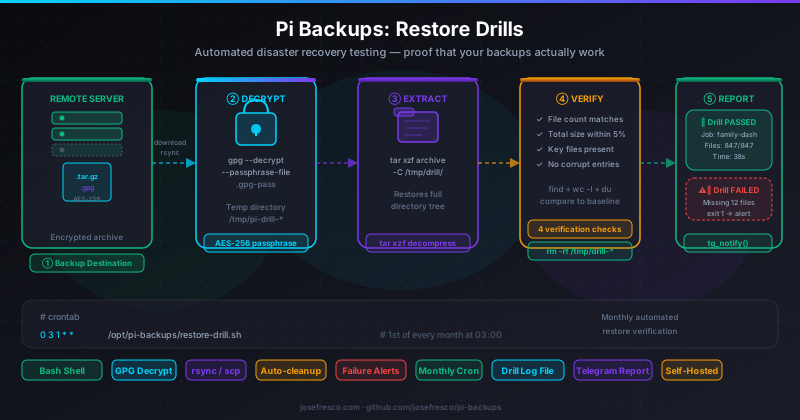
restore-drill.sh — a script that downloads the most recent encrypted archive from your backup destination, decrypts it with your stored GPG passphrase, extracts it to a temporary directory, runs four verification checks (file count, total size, key file presence, no corrupt entries), reports the result via Telegram using the existing tg_notify() function, and deletes the temp directory. Scheduled on the 1st of every month via cron, it gives you monthly proof that a real restore would actually succeed.
The Gap Between a Backup and a Restore
The original pi-backups release set up nightly rsync transfers to a remote host. The April update added GPG encryption and a verify.sh script that decrypts the most recent archive and checks its SHA-256 checksum. The June update added Telegram alerts for every run and a weekly health digest.
Each of those updates made the backup system more reliable. But they all share a silent assumption: that the thing you're backing up could actually be restored. verify.sh confirms an archive decrypts without error and matches its checksum. That's useful. What it doesn't do is confirm that the archive contains the right files, that the file count is correct, that key application data is present, or that extracting it to disk actually works without errors.
There's a well-known saying in operations: an untested backup is not a backup. The July 2026 update closes that gap with restore-drill.sh — a script that performs an end-to-end restore and verifies the result, every month, automatically.
What the Restore Drill Does
The drill script runs five steps in sequence. If any step fails, it sends a Telegram alert with the step name and exit code, cleans up the temp directory, and exits non-zero. No silent failures.
- Download: rsync copies the most recent
.tar.gz.gpgarchive from the remote backup destination to a local temp directory (/tmp/pi-drill-XXXXXX). - Decrypt: GPG decrypts the archive using the passphrase file, producing a
.tar.gzin the same temp directory. - Extract: tar extracts the decrypted archive into a subdirectory of the temp location.
- Verify: Four checks run against the extracted tree: file count, total size (within 5% of baseline), presence of key sentinel files defined in
.env, and atar --listpass to catch any corrupt entries. - Cleanup:
rm -rfdeletes the temp directory unconditionally — whether the drill passed or failed.
On success, the script sends a Telegram message with the job name, file count, archive size, and elapsed time. On failure, it sends an alert naming the step that broke and the exit code. Either way, you get a notification and the temp directory is gone.
The restore-drill.sh Script
Here's an abridged version of the script showing the core structure:
#!/usr/bin/env bash
set -euo pipefail
source "$(dirname "$0")/.env"

DRILL_DIR=$(mktemp -d /tmp/pi-drill-XXXXXX)
REMOTE_ARCHIVE="${REMOTE_USER}@${REMOTE_HOST}:${REMOTE_PATH}/${JOB_NAME}.tar.gz.gpg"
DECRYPTED="${DRILL_DIR}/${JOB_NAME}.tar.gz"
EXTRACT_DIR="${DRILL_DIR}/extracted"

SECONDS=0

cleanup() {
    rm -rf "${DRILL_DIR}"
}
trap cleanup EXIT

run_step() {
    local desc="$1"; shift
    "$@"
    local code=$?
    if [[ $code -ne 0 ]]; then
        tg_notify "⚠️ <b>Restore Drill FAILED</b>\n\nJob:   ${JOB_NAME}\nStep:  ${desc}\nExit:  ${code}"
        exit $code
    fi
}

run_step "rsync download" \
    rsync -az "${REMOTE_ARCHIVE}" "${DRILL_DIR}/"

run_step "GPG decrypt" \
    gpg --batch --yes --quiet \
        --passphrase-file "${GPG_PASSFILE}" \
        --output "${DECRYPTED}" \
        --decrypt "${DRILL_DIR}/${JOB_NAME}.tar.gz.gpg"

mkdir -p "${EXTRACT_DIR}"
run_step "tar extract" \
    tar xzf "${DECRYPTED}" -C "${EXTRACT_DIR}"

verify_restore
ELAPSED=$SECONDS

tg_notify "✅ <b>Restore Drill PASSED</b>\n\nJob:   ${JOB_NAME}\nFiles: ${ACTUAL_COUNT}/${BASELINE_COUNT}\nSize:  ${ACTUAL_SIZE}\nTime:  ${ELAPSED}s"
Two things worth noting. First, the trap cleanup EXIT call at the top ensures the temp directory is deleted no matter how the script exits — success, failure, or an unexpected signal. Cleanup is not optional. Second, run_step() is the same wrapper used in backup.sh since the June update, so the error-reporting pattern is consistent across all scripts in the project.
The verify_restore Function
The four verification checks live in a single verify_restore() function. The baseline values — expected file count and expected minimum size — are stored in .env alongside the backup configuration:
# Restore drill baseline for this job (set after first successful drill)
DRILL_BASELINE_COUNT=847
DRILL_BASELINE_MIN_SIZE_KB=51200   # 50 MB minimum
The function runs them in order, failing fast on the first mismatch:
verify_restore() {
    # Check 1: file count
    ACTUAL_COUNT=$(find "${EXTRACT_DIR}" -type f | wc -l)
    if [[ "${ACTUAL_COUNT}" -lt "${DRILL_BASELINE_COUNT}" ]]; then
        tg_notify "⚠️ File count mismatch: ${ACTUAL_COUNT} < ${DRILL_BASELINE_COUNT}"
        exit 1
    fi

    # Check 2: total size
    ACTUAL_SIZE_KB=$(du -sk "${EXTRACT_DIR}" | awk '{print $1}')
    if [[ "${ACTUAL_SIZE_KB}" -lt "${DRILL_BASELINE_MIN_SIZE_KB}" ]]; then
        tg_notify "⚠️ Size too small: ${ACTUAL_SIZE_KB} KB < ${DRILL_BASELINE_MIN_SIZE_KB} KB"
        exit 1
    fi
    ACTUAL_SIZE=$(du -sh "${EXTRACT_DIR}" | awk '{print $1}')

    # Check 3: sentinel files
    for sentinel in ${DRILL_SENTINEL_FILES}; do
        if [[ ! -f "${EXTRACT_DIR}/${sentinel}" ]]; then
            tg_notify "⚠️ Missing sentinel: ${sentinel}"
            exit 1
        fi
    done

    # Check 4: corrupt entries
    if ! tar tzf "${DECRYPTED}" > /dev/null 2>&1; then
        tg_notify "⚠️ Archive has corrupt entries (tar --list failed)"
        exit 1
    fi
}
Check 3 deserves a note. DRILL_SENTINEL_FILES is a space-separated list of paths relative to the extraction root — for example, "config/settings.json data/db.sqlite" for a project that relies on those two files to function. If either is missing from the extracted tree, the drill fails even if the file count and size look fine. Sentinel files catch the specific case where an rsync misconfiguration silently excluded the most important part of a project.
Scheduling the Monthly Drill
One cron entry per job. The drill runs at 03:00 on the first of the month — after the nightly backup at 02:00, so the archive it downloads is fresh from the night before:
# Nightly backup (existing)
0 2 * * * /opt/pi-backups/backup.sh family-dash

# Monthly restore drill (1st of month at 03:00)
0 3 1 * * /opt/pi-backups/restore-drill.sh family-dash
Multiple jobs each get their own drill cron entry, staggered by 30 minutes to avoid overlapping downloads:
0 3 1 * * /opt/pi-backups/restore-drill.sh family-dash
30 3 1 * * /opt/pi-backups/restore-drill.sh watch-list
0 4 1 * * /opt/pi-backups/restore-drill.sh pi-config
The Drill Log
Like backup.sh, the drill script appends a structured line to a log file after each run:
2026-07-01T03:00:44 family-dash PASS 847 54MB 38s
2026-07-01T03:30:51 watch-list PASS 312 18MB 22s
2026-08-01T03:00:29 family-dash PASS 851 54MB 36s
The log lives at /var/log/pi-backups/drill.log and uses the same logrotate config added in the June update. The weekly digest script (digest.sh) doesn't yet incorporate drill results — that's a planned addition — but the log records are there when it does.
Setting Baseline Values
The drill needs baseline values to compare against. The simplest approach is to run the drill manually once, note the file count and size from the Telegram report, and add those to .env. The script ships with a --calibrate flag that does this in one step:
# Run in calibrate mode — sets baseline values in .env automatically
/opt/pi-backups/restore-drill.sh --calibrate family-dash
In calibrate mode, the script runs the full download-decrypt-extract sequence, measures the result, writes the values to .env, and sends a Telegram message confirming the new baseline. Run it once after initial setup, then let the monthly cron take over.
Recalibrate after a major application update that changes the file structure significantly — for example, after migrating a SQLite database to a new schema that produces a different number of files on disk.
Running Your First Drill
To get started after pulling the July update:
# Pull the latest version
git pull origin main

# Add sentinel files for your job to .env
echo 'DRILL_SENTINEL_FILES="config/settings.json data/db.sqlite"' >> .env

# Calibrate baselines (runs a full drill and writes baseline values)
bash restore-drill.sh --calibrate family-dash

# Add the monthly cron entry
(crontab -l; echo "0 3 1 * * /opt/pi-backups/restore-drill.sh family-dash") | crontab -
The calibrate run sends a Telegram message confirming the baseline was set. After that, the drill runs automatically on the first of every month and you get a pass or fail notification without thinking about it.
What the July 2026 Update Ships
- restore-drill.sh: The main drill script. Downloads the latest encrypted archive from the remote destination, decrypts, extracts, verifies, cleans up, and reports to Telegram. Accepts a job name as its only argument (plus optional
--calibrateflag). - Four verification checks: File count vs. baseline, total size vs. minimum, sentinel file presence, and corrupt-entry scan via
tar --list. All four must pass for the drill to succeed. - Calibration mode:
--calibrateruns the drill, measures the result, and writesDRILL_BASELINE_COUNTandDRILL_BASELINE_MIN_SIZE_KBto.envautomatically. - Drill log: Appends a structured record to
/var/log/pi-backups/drill.logafter every run for later analysis. - Guaranteed cleanup:
trap cleanup EXITensures the temp directory is always deleted, even if the script is killed mid-run.
The Full pi-backups Stack
After four updates, the project now covers the complete lifecycle of a self-hosted Pi backup system:
- March 2026: rsync foundation — nightly transfers to a remote host over SSH.
- April 2026: GPG encryption — AES-256 encrypted archives and checksum verification.
- June 2026: Telegram alerts — per-run notifications and a weekly health digest.
- July 2026: Restore drills — monthly automated proof that a real restore would succeed.
The full project is at github.com/josefresco/pi-backups. If you're starting fresh, the posts above cover each layer in order — start with the rsync foundation and add each layer when it makes sense for your setup.